Brian Ure
 1
COW Coin
1
COW Coin
Forum Replies Created
-

Brian Ure
May 29, 2022 at 1:22 pm in reply to: Javascript one-time actions. Run code only once. Is it possible?Hey, Timur! Thank you so much for this code! Yes, this is what I’ve been trying to do all day. I took this chance to start learning scripting, which seems even cooler than expressions. I already learned how to create windows and buttons, I learned how to assign functions to buttons but you’re absolutely right I would love to learn how to reference a specific composition! I seem to be getting the syntax wrong somewhere.
I’ve tried:
comp(“Global Topic Reference”);
app.project.comp(“Global Topic Reference”);
app.project.compItem(“Global Topic Reference”);
Nothing seems to work for me! I would love it if you could share this with me! I’ve also been looking for educational content but it feels like there’s not a lot out there about Javascript for scripting.
-
Brian Ure
May 29, 2022 at 11:03 am in reply to: Javascript one-time actions. Run code only once. Is it possible?Hey, Walter! Thanks for your interest, man. I’ll try to explain better. But I have to say I almost know the answer is going to be that it’s not possible, haha.
I have two templates, they display the names of the topics that are being discussed. There are many topics in a single video. We create guides to teach viewers how to play a video game.
The first template is a ‘screen title’ type of template. It takes most of the screen space and it announces when a topic change happens.
The second template is meant to kick in right after the first one animates out and it’s a small template that only exists in the top right corner of the screen. it also displays the name of the topic for as long as the topic lasts and it has a timer that reaches 0:00 when the topic ends(and the new topic screen kicks in). It also has an optional bar that displays the name of the next topic. It says: ‘Coming up: Name of the next topic’.
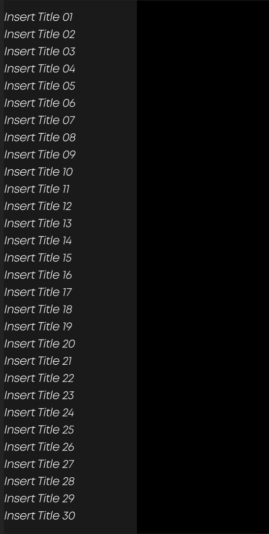
So what I’m trying to solve is that now the editors have to type every topic title 3 times. And that sucks. So I want to find a way for editors to type all titles once in a separate composition; “Global Title Reference”.
This composition is never going to make it to the final video. It’s meant to serve as a place where editors go, type all the titles for that video, and then the main templates have scripts that go and fetch the correct titles they’re supposed to display within that composition.
The reason I can’t use essential graphics with this ‘Global Title Reference’ composition is that these titles are meant to be referenced by 2 separate templates that almost have nothing to do with each other. And the master properties don’t change the original contents of the composition. So that would mean that only one template could fetch the correct titles.
Instead, the templates reference the actual titles inside of the composition. Everything works fine. The only issue is that after the video is done and the editors clean the templates so they’re ready to be used on another video. I have no way to set the text layers inside ‘Global Title Reference’ back to the default “Insert Title” sourceText value.
This is not entirely necessary to do but I want to figure out how to do this just to simply grow as a coding animator. I really like visual order and cleanliness as well as code elegance so I would love for this global title reference composition not to be tainted with titles from previous projects.
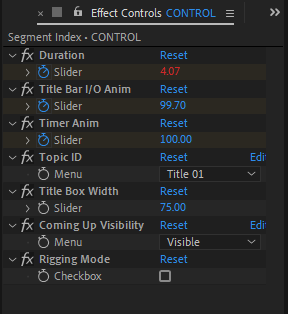
I’ve attached other images showing the controls being referenced and one of the expressions I’ve written for the title. It fetches the correct title based on an Id menu that the editor assigns and it works through essential properties. You basically use that menu to tell the template what title number it’s supposed to be. At the end it also has an if/else statement that adds a linebreak in the middle if the text bounding box surpasses a certain width.
How would you go about this? I hope it’s a fun little challenge! I’m currently trying to learn how to do a simple script that only has one button that does this.

-
Hey Walter thank you so much man! Wow! This is indeed life changing! You did actually solve my problem at the end!
-
Thank you so much. This did not solve the initial question but it gave me ideas on how to work around some other things using essential graphics panel!
One question thought: I know you can create different instances on Premiere using Eseential Graphics, but as far as I know you can’t create “virtual isntances” within after effects itself, right? I can’t just have one comp and modify it in different ways from the EG pannel without having to true duplicate them. If you bring the same comp twice onto a amster comp, modifying one from the eg panel will change both, because they are the same comp.
Having this ‘instance’ feature work inside after effects itself would be a tremendously powerful tool to have for me!
-
For anyone looking for an answer on how I solved my problem:
I modified my expression so that it does not address the entire name of the comp, but1 rather some parts of the name only. I did this with the ‘split’ method, which you should go study if you don’t know what I’m talking about since I will not go in depth here about it.(great tutorial on it here: https://www.youtube.com/watch?v=C5ZwX8zk4eg)
But basically here’s the code:
n = thisLayer.name.split(” “)[1].charAt(0);
thisComp.layer(“Control”).effect(“Opacity Option “+n)(“Slider”)This expression lives within the opacity property of my pre-comp layer called “Option A”.
On the first line I am referencing the name of the layer, but not the entire name, specifically, the second word, and more specifically, the first character of the second word. This way if After Effects changes the name and adds a million numbers at the end of it, the expression won’t break since it only cares about the first character on the second word, which will always be “A”.
Some contents or functionalities here are not available due to your cookie preferences!This happens because the functionality/content marked as “Google Youtube” uses cookies that you choosed to keep disabled. In order to view this content or use this functionality, please enable cookies: click here to open your cookie preferences.