Forum Replies Created

  • Brian Quass

    June 6, 2022 at 6:17 pm in reply to: Trouble Importing SCC files into Premiere Pro

    Okay, I finally got a callback from Adobe. It turns out that Premiere Pro is not designed to import SCC files UNLESS those SCC files were created in Premiere Pro.

    I wish they had told me that up front. I do not think they make that clear in their documentation either — or at least I never noticed that clarification. Adobe seemed to be defensive about this. To confuse matters, they kept blaming it on my software, without telling me that PP won’t import SCC files from ANY outside caption creation system.

    So in some sense, Adobe doesn’t use real SCC files at all, since legitimate SCC files cannot even be imported into Premiere Pro.

    They use a format that is tweaked to be proprietary, I guess.

    [sigh]

  • Brian Quass

    June 6, 2022 at 12:03 pm in reply to: Trouble Importing SCC files into Premiere Pro

    I almost feel like I’m the victim of a practical joke.

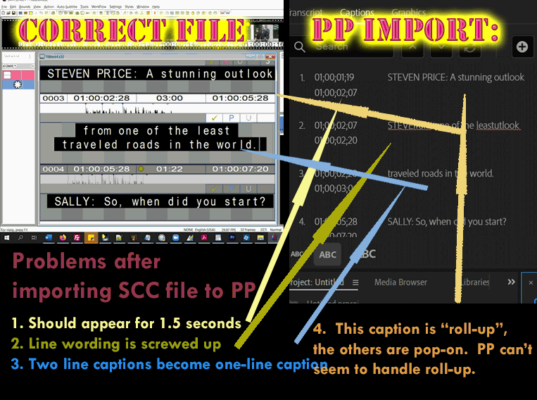
    PP utterly DESTROYS my scc files:

    When I import scc files:

    Center-justification is changed to left.

    Italics are removed.

    Roll-up captions “blend over” into the captions that follow them, creating typos.

    Timing is changed so that 2-second caps have less than 20 frames of appear time.

    It makes me think that PP is not designed to work with real Line 21 scc captions,

    just with whatever the user creates inside PP itself.

  • Brian Quass

    June 6, 2022 at 2:14 am in reply to: Trouble Importing SCC files into Premiere Pro

    It’s not just the timing that is screwed up when I import scc files to Premiere Pro. It also messes up the words! Some of this seems to be due to the fact that the first caption with text is “roll-up,” not “pop-on” like the rest. PP can’t seem to handle that.

We use anonymous cookies to give you the best experience we can.
Our Privacy policy | GDPR Policy