Forum Replies Created

Page 9 of 15
  • Adam Greenberg

    June 14, 2022 at 3:58 pm in reply to: Anyway to link In and Out to a slider?

    yes you can, where is the image.

    and also, is there an ”out” we need to consider ?

  • Adam Greenberg

    June 7, 2022 at 2:11 pm in reply to: Easier way to key out a person from a clip?

    is your person shot over a green screen ? you can post your clip and we can suggest the best way to go about it. There are a few ways to do it, but it really depends on the footage before you can decide which way is the best.

  • Adam Greenberg

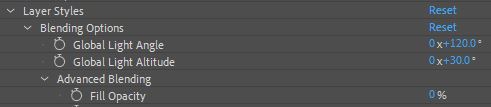
    June 1, 2022 at 1:34 pm in reply to: Outer Glow Effect

    if you are using layer styles for the outer glow, then the layer styles allwos for a 0% fill, ( see pic ) but if you want to use effects, I think duplicating the layer and putting it in silhouette is a quick fix. ( you could also parent it in case you change position or size afterwards )

  • Adam Greenberg

    May 30, 2022 at 2:44 pm in reply to: Help with Variable Color expression

    Oh i misunderstood, is there any animation in the color, if not i suspect this is super easy, can you post a jpeg of what you want it to look like, (or if its animated, ) a quicktime ?

  • Adam Greenberg

    May 27, 2022 at 1:20 pm in reply to: Source Text work around for text

    Andrei, I guess I am looking for something that is not possible, basically the user makes the text how he needs to but without using the character palette, ( like the upper line in the pic ) but this exact form would be carried over in other compositions, basically exactly how it would work had you had a precomp of text, and that precomp was used in many comps. So I tried to use 3 parameters in my example that i foresee as very likely. indicidual character size and position like the ”th” – individual character tracking like JULY, and capitals. Can any of these things be accomplished without the character palaette ? I need the text to appear in other comps exactly the same way once a user has edited it in that way rather than it appearing as it does on line 2

  • Adam Greenberg

    May 26, 2022 at 9:20 pm in reply to: Help with Variable Color expression
  • Adam Greenberg

    May 26, 2022 at 9:04 pm in reply to: Help with Variable Color expression

    i have a text layer that animates through 4 different colors but its more gradual, so you will need to edit it with some sort of index which Im not fully sure how to do. ill post it here in the next post hopefully it will get you closer to where you need to be

  • Adam Greenberg

    May 20, 2022 at 1:54 pm in reply to: Adding text in another font after a text layer

    this has been finally solved. I’d like to give credit to Laurent Lavergne. I am including a copy of the project and the 2 lines of code;

    on the multiline text layer this needs to be added to the sourcetext;

    const theText = text.sourceText.value;

    const lines = theText.split(/\r/);

    (time < inPoint) ? lines[lines.length-1] : theText

    and on the other layer which could be anything ( a precomp, a text layer, an imported logo ), add to the position x this code;

    const posRef = thisComp.layer(“text”).transform.xPosition;

    const widthRef = thisComp.layer(“text”).sourceRectAtTime(-1, false).width;

    value + widthRef

    and to the y position this code;

    const layerRef = thisComp.layer(“text”);

    const theText = layerRef.text.sourceText;

    const lines = theText.split(/\r/);

    const numLines = lines.length -1;

    const textLeading = theText.style.leading;

    value + numLines * textLeading

  • Adam Greenberg

    May 20, 2022 at 1:52 pm in reply to: Finding the position of the last character

    this has been finally solved. I’d like to give credit to Laurent Lavergne. I am including a copy of the project and the 3 lines of code;

    on the multiline text layer this needs to be added to the sourcetext;

    const theText = text.sourceText.value;

    const lines = theText.split(/\r/);

    (time < inPoint) ? lines[lines.length-1] : theText

    and on the other layer which could be anything ( a precomp, a text layer, an imported logo ), add to the position x this code;

    const posRef = thisComp.layer(“text”).transform.xPosition;

    const widthRef = thisComp.layer(“text”).sourceRectAtTime(-1, false).width;

    value + widthRef

    and to the y position this code;

    const layerRef = thisComp.layer(“text”);

    const theText = layerRef.text.sourceText;

    const lines = theText.split(/\r/);

    const numLines = lines.length -1;

    const textLeading = theText.style.leading;

    value + numLines * textLeading

  • Adam Greenberg

    May 18, 2022 at 3:47 pm in reply to: Anchors Point is lock!
Page 9 of 15

We use anonymous cookies to give you the best experience we can.
Our Privacy policy | GDPR Policy