-
yposition expression to control a text layers position in a list
Hello,
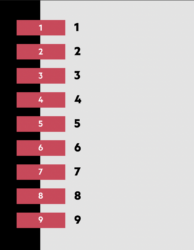
I’m creating a list to be used in a mogrt for a client (attached screenshot).
I have 9 seperate text layers, left justified, stacked vertically.
The first text layer sets the position, as well as two keyframes on the xposition that animate layer on (slide on from off screen).
The remaining text layers reference this first layer and each is 100 pixels below the layer above (index-1). The xposition also follows the layer above on a 0.1 delay.
There is also 9 seperate redbox precomps that line up with each layer, to the left (attached screenshot).
In the essential graphics UI the user can turn off an individual text layer which also turn off the red box precomp next to it (checkbox linked to opacity) or can rename the text layer or the redbox (source text link).
What would be the y.position expression so if any of the layers above the current layer are turned off, all the layers shuffle up so there are no empty lines.
Eg…
Frog
Cat
Dog
Fish
Cow
Rat
And a user might turn off three text layers…
Frog
.
Dog
.
.
Rat
So the expression would need to reposition the y position of remaining text layers and reference the x position animation to its new theoretical index ranking…
Frog
Dog
Rat
Hopefully that makes sense.
My next question would be, can I add additional text layers that have their opacity default to off, but if the user needed a 10, 11 or 12 lines they could turn on the checkbox and the position of each layer would adapt so they could all squeeze into the 980 pixels height allowance – reducing the yposition between each layer as opposed to scaling them down.
I did try if/else statements but it just turned into a blood bath.
Thanks so much
Henry