

Activity › Forums › Maxon Cinema 4D › Will R17 Run on Win11?
-
Will R17 Run on Win11?
Posted by Ron Moore on June 9, 2024 at 6:15 amI’ve just upgraded to Win11 and installed Unreal Engine 5.4 and Blender 4.1 on a new computer but still do some projects on my trusted R17 edition and am curious what the chances are that it might actually run on Win11? Might save me some time should anyone know.
Kouraib Abdmalek replied 2 years, 2 months ago 3 Members · 5 Replies -
5 Replies
-

Kouraib Abdmalek
June 9, 2024 at 9:43 amHi Ron,
I do not think that installing the R17 version on Window 11 will be go without from problems, because it is common that problems with Windows 11 appear from R20 and R21 works well, so I do not think that R17 will have better luck.
-

Tom Morton
June 10, 2024 at 6:27 amPersonally, I’m not sure why there would be any problems? I have windows 11 and keep it fully up to date, and do 80% of my animation and 3D modelling in Visualize R20 which works without a single problem. I think it’s one of the most stable design programs I use, much more reliable then any Adobe program for instance, which makes my modelling work very enjoyable.
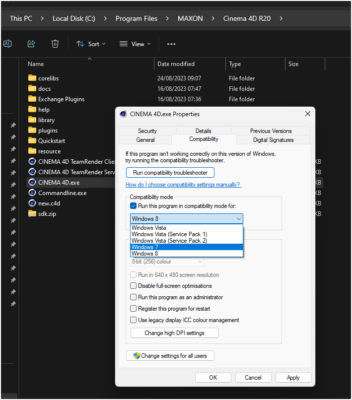
Windows also has backwards compatibility modes too so even if you run into an issue, you could run the program in “Windows 7” compatibility mode for instance. Just right click on the program file to do this, as per attached image. But I’ve never had to do this myself.

-
Kouraib Abdmalek
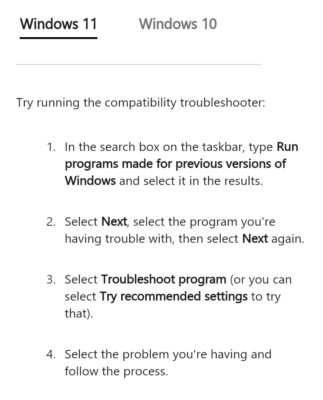
June 10, 2024 at 10:31 amPerhaps the matter differs between someone who was originally using R20 and then upgraded to Windows 11 and someone who wants to install the program, because there are already many people complaining about problems that go away by moving to R21. However, the solution that Tom suggested may be useful, just the steps he mentioned. Recommended by Microsoft’s website for Windows 10. For Windows 11, they suggest following the steps as in the image below.
support.microsoft.com
Make older apps or programs compatible with Windows - Microsoft Support
Learn how to get older apps or programs to run on Windows 10 or Windows 11 by adjusting compatibility settings.
-

Ron Moore
June 10, 2024 at 2:57 pmHey, thank you both for the good info on this issue. Think I just may try to get R17 going on the new system since I’ve always struggled with big daylong renders with my underpowered computer in the past.
-
Kouraib Abdmalek
June 11, 2024 at 10:01 amYou are welcome, Ron! I hope you could share your experience with us, that will be useful for those who may face the same issue, or we may help if you have any problems.
Thanks!

Reply to this Discussion! Login or Sign Up