Creative Communities of the World Forums

The peer to peer support community for media production professionals.

Activity Forums Adobe Premiere Pro When I scale up adjustment layer too much it goes to black

  • When I scale up adjustment layer too much it goes to black

    Posted by Dan Hirshon on May 24, 2024 at 8:23 pm

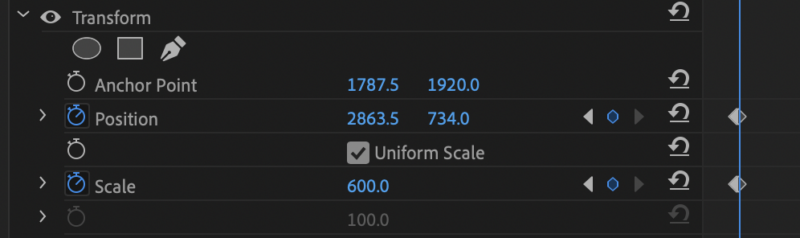
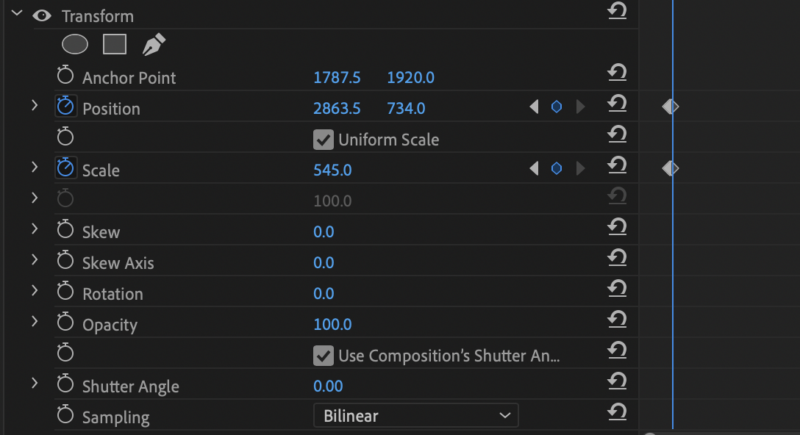
    Hi, I’m using an adjustment layer in Premiere Pro 24.4.1 (Build 2) on a Macbook Pro 2019. 2.4 GHz 8-Core Intel Core i9, with an AMD Radeon Pro 5600M 8 GB Intel UHD Graphics 630 1536 MB Graphics, 64GB Memory, Sonoma 14.4.1.When I’m at 545 for the scale I can see the image, but when I go to 600 or higher, the screen goes black. Any suggestions on what I can adjust so I can still scale up? Thanks!

    Ann Bens replied 1 year, 11 months ago 3 Members · 3 Replies
  • 3 Replies
  • Hector Vera

    May 27, 2024 at 3:49 pm

    Its probably because there is a max resolution limit that is already set on your Premiere Pro. Try increasing the Max Res allowed in your Premiere Pro project settings. In order to do this, need to do the following:

    1.) Go to “File” > “Project Settings in Premiere Pro.

    2.) Under the “General” tab, look for the “Max resolution” option. By default, this should be set to “Auto.”

    3.) Set Max Res higher than the resolution of your adjustment layer. For example, if your current resolution is 1920×1080, you can try setting the maximum resolution to 4K (3840×2160) or even higher if possible.

    4.) Click “OK” to save your changes.

    This change should allow you to scale up your adjustment layer without the image turning black at a certain point. Best of luck there! 🙂

  • Ann Bens

    May 27, 2024 at 8:59 pm

    Max Resolution? There is no such setting in Premiere.

  • Ann Bens

    May 27, 2024 at 9:00 pm

    Save scale range for Transform effect is 300.

We use anonymous cookies to give you the best experience we can.
Our Privacy policy | GDPR Policy