

Activity › Forums › Adobe After Effects › Weird Colour Artifacts with Colourama
-
Weird Colour Artifacts with Colourama
Posted by Michael Lee on June 13, 2023 at 6:53 pmHey everyone,
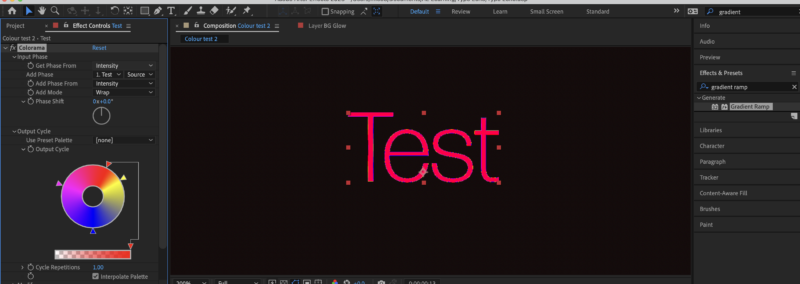
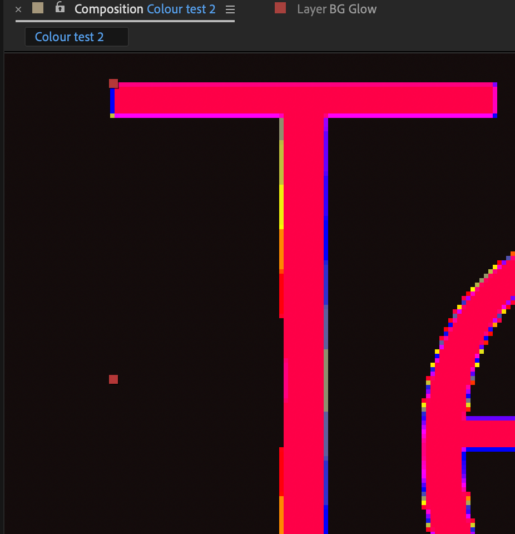
First off, thank you for your time reading my AE problem. I was trying to apply colourama to a text layer but it seems like no matter what settings I played with, I couldn’t get rid of the colour artifacts on the edge of the letters. I’ve attached a screen grab for your reference. Your help will be much appreciated if you know how to resolve this.
Cheers,
Michael
 Filip Vandueren replied 3 years, 3 months ago 3 Members · 7 Replies
 -
7 Replies
-

Filip Vandueren
June 13, 2023 at 8:54 pmHey Michael, the Text is anti-aliased, and right now your Colorama is set up to color according to the intensity. I would only expect to see these artefacts if it was based on Alpha (because that’s where the anitaliasing is happening)
This means that it is actually seeing some darker values in the edges of the text.
My guess is that the White text has a very tiny black stroke of a pixel or even less. (even 0,01 will show up)
-

Anders Hattne
June 14, 2023 at 2:00 pmDoes “Modify Alpha” under the Modify section help?
Maybe a bit of this could help too
https://aescripts.com/fxaa/ -

Michael Lee
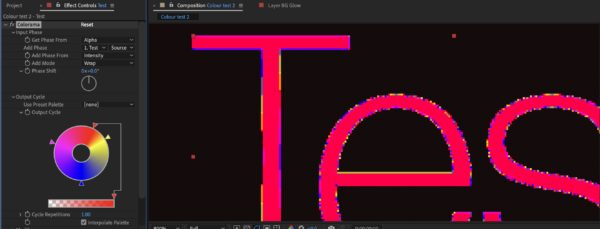
June 14, 2023 at 5:01 pmThanks Filip for jumping in for help. I’ve tried setting the source to Alpha but that doesn’t seem to resolve the issue. The jagged colour on the edge changed in appearance though but still causing the same problem.
-
Filip Vandueren
June 14, 2023 at 6:19 pmYes, like I said: Alpha will guarantee there are rainbow fringes. You have to check that the white text doesn’t have a black outline. Set it to transparant, or white, not to 0 width. Because that’s actually 0,01 px and still enough to mix in a few slightly non white pixels which gets picked up by colorama.
What are your actually trying to achieve? Because if everything is set up perfectly, you’ll just get red text 🙂
-
Michael Lee
June 14, 2023 at 7:35 pmI’m trying to create a typography echo effect with colourama. But as you can see the colour fringes throws me off. I also tried making it the fonts into shapes but that didn’t seem to help either.
-
Filip Vandueren
June 15, 2023 at 8:40 amOK, the tricky part is this:
you want to base it on Alpha, because the difference in opacity of the echoes is what you want to cause the different colors. But if you do that, After Effects also will interpret the pixels on the soft edges of each letter as different opacities, giving them different colors (the rainbow fringe)
I think the best solution is having two layers:
On the original text layer, you add a 1 pixel white outline, the echo, and the colorama.
Duplicate the text layer, but you disable the outline and the colorama, and you use this as an alpha matte for the colorama layer: the rainbow fringes will now be hidden because the are 1 pixel outside of the matte.
Reply to this Discussion! Login or Sign Up