-
Walk me through using Math.sin() to define an elliptical orbit.
–WHAT I’M DOING/BACKSTORY–
We’ve all had a project where there’s icons or text orbiting around a central point of interest. Attaching a layer to a centralized null and adding “parent.transform.rotation*-1” is almost always good enough. Once you have those orbiting objects become rectangles, such is generally the case with text, that’s not quite enough. Objects closer to the bottom/top need to be “closer” to the central point, and things on the left/right need to be further from the central point to avoid unwanted overlapping.
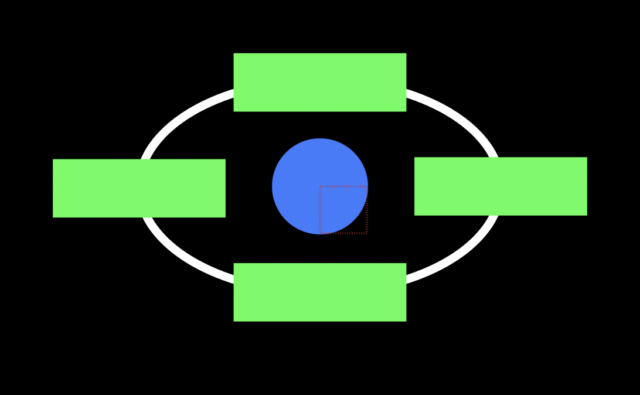
On the assumption that each rectangle is of equal size, there aught to be an ideal orbit path that ensures each object can hold an orbit while keeping the layer bounds at roughly the same distance from the center circle. I’ve attached a photo of what I’m describing. The white circle is the desired path around the center point.
–DESIRED INPUT METHOD–
I currently have the green rectangles parented to a null in the center of the blue circle. The Y position value of each rectangle is equal to the distance between its anchor point and the anchor point of the null, with a value of 0 being positioned directly on top of the null. As the central null rotates, I want the Y position value to automatically oscillate between the closest distance (top/bottom) and furthest distance (left/right) every 90 degrees the central null rotates. Ideally I’d also like to be able to flexibly define what the closest and highest distances are. It would add flexibility to the types of shapes I can accommodate for, as well as create interesting potential for more dynamic animations.
–ADDITIONAL THOUGHTS–
Trig has never been my strongest subject in math. Sin/Cos/Tan have always confused me. While a copy-pasteable expression is handy, I’m definitely more interested in better understanding what each number in the final expression means, and why it affects things the ways it does. Teach a man to fish, so to speak.