-
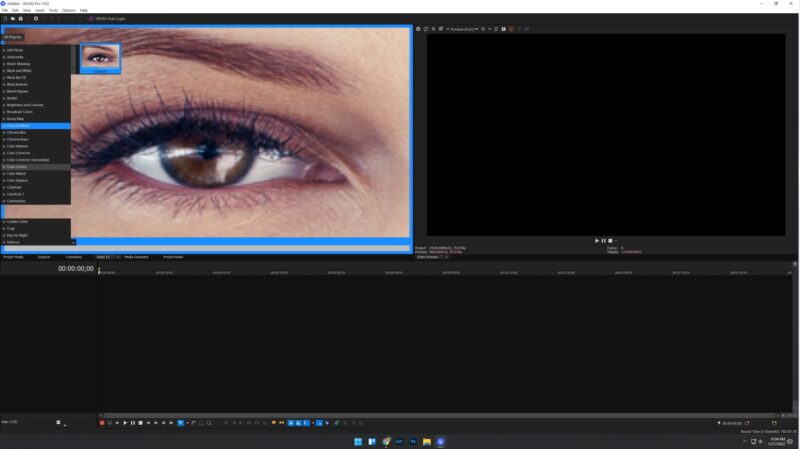
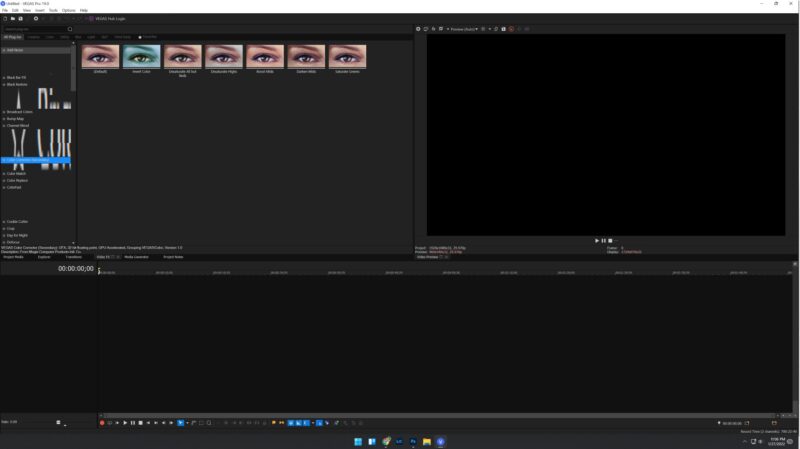
VP19 editor artifacts and distortion after Win 11 Upgrade (see pics)
Hello,
Without even thinking I upgraded to Win 11. Immediately after, when I started to edit in Vegas Pro 19, as I move the mouse over the video FX, distortion occurs, stuff shows up that shouldn’t and it’s a disaster.
I experienced this years ago on a previous version of VP, back then I had to disable a service that wasn’t really needed and it fixed it right away, but I can not find the article that said what to do.
So Windows 11 somehow must have enabled something similar that is screwing up the editor. I was about to attempt to roll back to Windows 10 but if the fix is as easy as it was before, I wonder if anyone knows which service needs to be disabled to stop this problem from happening.
See attached images.
Otherwise I’ll have to try to rollback to win 10 and all the problems that may create, but I can not work in VP with this happening.
Thank you!