

Activity › Forums › Maxon Cinema 4D › Voronoi Fracture Dynamics Not Working When Set To Trigger On Collision
-
Voronoi Fracture Dynamics Not Working When Set To Trigger On Collision
Kouraib Abdmalek replied 2 years, 10 months ago 7 Members · 27 Replies
-

Din Iulian silviu
August 16, 2018 at 5:39 pmI have made a “trick” here, but doesn’t look real…
https://drive.google.com/open?id=1tObusJfvqVzYvd9cj_rpGKGfkl6WV25L
any solution? -

Brian Jones
August 16, 2018 at 7:55 pmHere’s with a couple of wind objects, one to add force just before and during the collision (then turned off) to force the pieces forward and a second with a linear falloff to keep the pieces moving backward from moving too far. I also changed the VFracture source to make it so there were more small pieces at the front face when it collides. There are differences if the winds are Accelerations or Forces and the Strength settings. It’s not totally real but much more beliveable.
12652_glassandbowlingball2.c4d.zip
-

Tyler Brooks
January 6, 2021 at 4:25 pmHi Brian,
Do you by any chance still have this project file? The link here seems to be broken, and I’m trying to figure out this exact problem of using Xpresso to keep self-collisions off in Voronoi fracture until the rigid body object drops to the floor.
-
Brian Jones
January 6, 2021 at 6:38 pmHi Tyler, oh wow the new Cow didn’t keep the old files (and I don’t seem to be able to go and edit old posts)… so which file in that thread? I still have most of the files I uploaded I think.
-
Dovlet Ov
October 25, 2023 at 4:14 pmHello,
I have a similar problem with a slightly different animation. My object (an hourglass) is placed at the top of a cube, the cube moves and the hourglass is supposed to fall and break. If I set the trigger to Immediately everything happens before it starts falling. If I set it to On Collision it just sits there and not falling. I experimented without a cube and falls and breaks just fine. However I am expecting it to flip around once or twice instead of falling like a bomb. Any ideas/suggestions? C4D R19
-

Kouraib Abdmalek
October 26, 2023 at 9:46 amHi Dovlet,
To make your body fall in the way you want so that it does not just go down in free fall under the influence of gravity, you must use Dynamic invisible Collision to achieve this. In the link below, there is a very short tutorial to do something similar. I hope it will be useful to you.
Thanks
https://youtu.be/KgFVRYkRrCU?feature=shared
Some contents or functionalities here are not available due to your cookie preferences!This happens because the functionality/content marked as “Google Youtube” uses cookies that you choosed to keep disabled. In order to view this content or use this functionality, please enable cookies: click here to open your cookie preferences.
-
Dovlet Ov
October 29, 2023 at 2:38 pmDear Kouraib,
Thank you so much for the suggestion. While very useful, it is slightly not what I have been trying to achieve. To add to the complexity, the hourglass bulb is now placed in a frame and it explodes as soon as I hit play. But when it is not in the frame it just hangs in the air. The Voronoi is set to Rigid Body and trigger is set to on collision.
-
Kouraib Abdmalek
October 30, 2023 at 8:25 amyou are welcome Dovlet! If you can record your screen with the right panel while your model moving or post your file here so we can check it for you I think that would be even better.
thanks!
-
Dovlet Ov
November 6, 2023 at 2:42 pmHi,
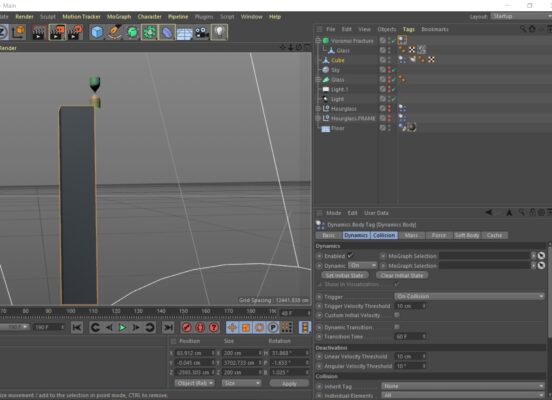
I took a screenshot. The cube simulation is set to Rigid Body, it does wobble a bit to allow for the hourglass to fall off. The Voronoi on the hourglass is set to Rigid body with simulation set to On Collision. It won’t fall. If I set it to Immediately it just breaks down before even starting to fall. Once I have sorted this out I would love to figure out the frame/glass conflict.

-
Kouraib Abdmalek
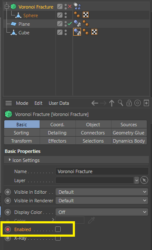
November 7, 2023 at 10:08 amThank you for the clarification. I think now I get where the problem is. We must delay “voronoi fracture” activating until the hour glass reaches the ground. You could do this by disabling the voronoi and then recording it on the timeline until the frame, where the clock touches the ground, reactivates again as in the screenshot and the attached file. You could also do this via Expresso, as in the attached image.
I hope this helps you

Reply to this Discussion! Login or Sign Up