Creative Communities of the World Forums

The peer to peer support community for media production professionals.

Activity Forums Maxon Cinema 4D Volume Builder coordinate/PSR problem

  • Volume Builder coordinate/PSR problem

    Posted by Zeyd Ayoob on August 16, 2021 at 5:50 pm

    Hello all.

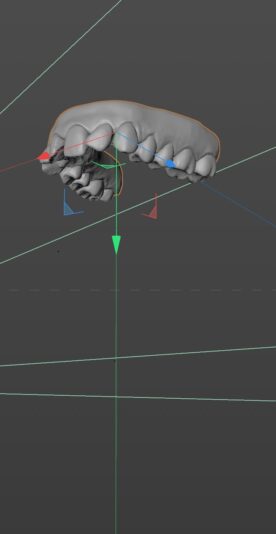
    I have a model that consists of a lower set of teeth – the gum and each tooth are all separate meshes.

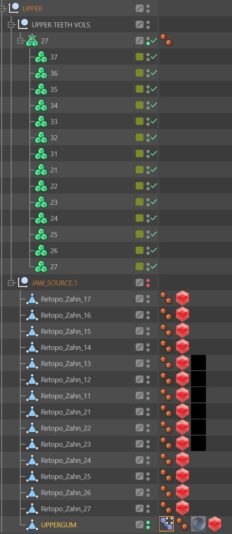
    I have created a Volume Builder object for each tooth. Each VB object also contains the gum mesh set to subtract, so the VB teeth are all cut off at the gum line.

    All the VBs are in null. The original mesh models are in another null. Both nulls PSR are totally zeroed out. Both of these nulls are in a parent null, also totally zeroed out.

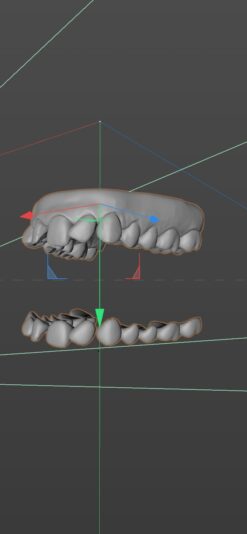
    Everything works great, except if I try to move the parent null. If I do so the VBs move separately. For example, if I move the parent null 50cm down, the VB teeth move to around 115cm down. Same happens with rotation.

    The reason I have everything in a parent null, is I need to animate everything together. However because of this issue I am unable to, and its driving me slightly crazy.

    I have tried everything I can think of, have googled endlessly. I even tried placing all the VBs with the mesher in the same null as the original mesh, same thing happens.

    I hope someone can shed some light on this.

    Many thanks in advance.

    Andy Kiernan replied 4 years, 9 months ago 2 Members · 3 Replies
  • 3 Replies
  • Andy Kiernan

    August 17, 2021 at 7:51 am

    Is there anything else happening in your OM? I have tried recreating the issue but I can move either parent null successfully. I’ve attached the scene file (R20). It sounds like double transformations, I have just noticed a pose morph in the hierarchy, have you tried removing that?

  • Zeyd Ayoob

    August 17, 2021 at 12:05 pm

    Thanks for the reply Andy – yeah I tried removing the pose morph tag as well, problem remains.

    I think I’ve literaly just found the issue, and came back to report it. I forgot that the original teeth have some very slight animation to them ( so slight I forgot about it ) and when the volume builders were built, the null that the source teeth were in was NOT zeroed out at the time, which has led to this problem.

    A classic example of becoming overwhelmed by a scene and forgetting the very early steps of setting it up! Im now having to rebuild it and see if the resolution Im suggesting above actually solves it. Will come back and update if so.

    Thanks again.

  • Andy Kiernan

    August 18, 2021 at 7:45 am

    Doh, yer I’ve been there brother. Well, it’s good that you have made progress so good luck with the rest!

We use anonymous cookies to give you the best experience we can.
Our Privacy policy | GDPR Policy