-
Vignette mask cutting off/cropping shot
Hi all,
Having an issue with the vignette mask filter. And it may be, unfortunately, the nature of what a vignette does that is the problem, but I’m not sure.
I took the vignette mask filter into motion to add the ability to rotate the shot. Reason being, we’re doing a thing where faces appear at smaller size over shots. Kind of fade up and out and I wanted to have a very faded look around the edges (and really couldn’t get any other filters to work.
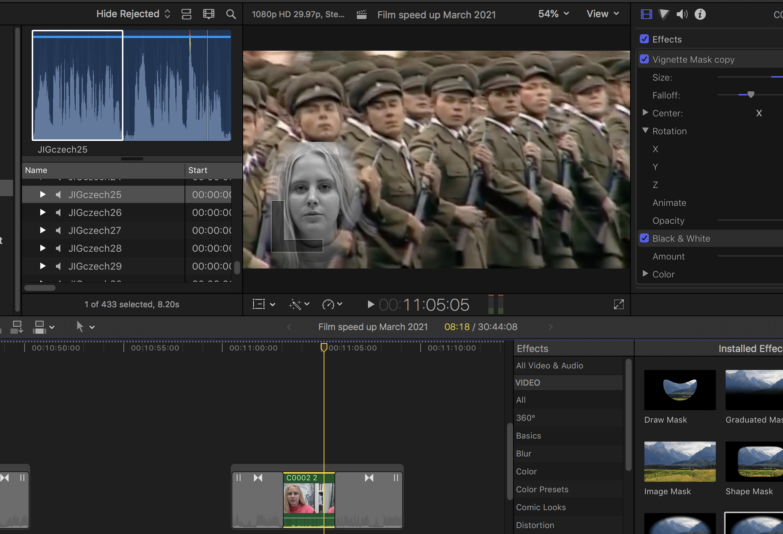
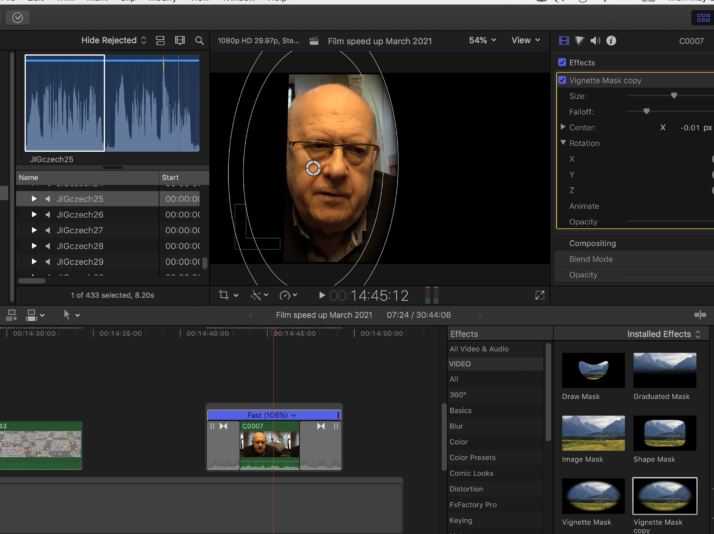
This solution seems to be working fine for any shot where the subject is fairly well centered in frame, if they are off to either side, when I add the effect and rotate it to a vertical, for reason the shot is cut off, almost to a 4×3. I’ve attached a photo that I hope shows what I mean. The shot with the girl is close to what I’m after, the shot with the man is showing the cut off on the left. I’ve turned off all other effects, tried to undo any crop or trim (that FCPX doesn’t recognize as having occurred) and no luck.
I’m wondering if the very nature of a vignette look is that it cuts off, but I don’t have the issue on top/bottom or sides when I add the effect; only when I rotate it.
Any thoughts/ideas on what I might be missing are much appreciated.
Thanks