

Activity › Forums › Apple Final Cut Pro › “Video lanes”
-
“Video lanes”
Posted by Andrew Johnstone on December 1, 2020 at 3:59 pmI have been cutting on FCPX for the past 3 years and while I hated it at first, I really like it now.
But, I am struggling with an approach for subtitles (not using iTT or SRT subs) that will allow me to avoid an utterly messy timeline.
Audio lanes are very handy when you’re dubbing audio, it would be great to be able to have a similar tool for video tracks and to be able to turn video tracks on an off (sort of like you can do on PP or used to be able to do in FCP7….eeek!).
Anyone know if this is possible..?
Pj Wassermann replied 5 years, 5 months ago 7 Members · 13 Replies -
13 Replies
-

Doug Metz
December 1, 2020 at 5:19 pmThis sounds like a perfect job for Roles. I typically set up distinct roles for lower thirds, different categories of gfx, etc. This allows you to switch them on/off in the timeline index.
-

Andrew Johnstone
December 1, 2020 at 6:23 pmYes, but i am not sure role will separate out in video in the way they do for audio? using Audio roles & lanes for a dub right now and it works really well – though I thin it still has limitations. Would be nice to be able to add an effect to an entire lane (eg to EQ one voice or apply a filter) without just copying and pasting fx from clip to clip – sort of as you can in Logic (I think – I know you can do this in Pro Tools).
being able to turn video tracks on an off is also something I miss.
-

Andreas Kiel
December 1, 2020 at 6:26 pm“This sounds like a perfect job for Roles”
I second that!
Roles work perfect for this.
-

Chad Greene
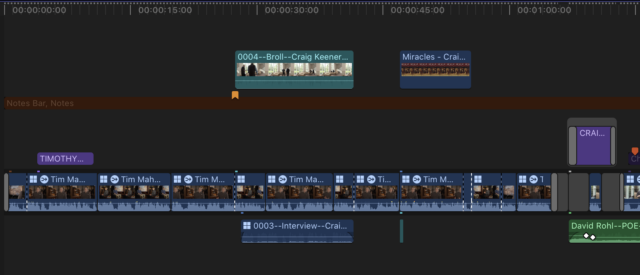
December 3, 2020 at 8:41 pmAndrew, there are time I would love video lanes as well. Until Apple adds that feature we use a disabled title as a separator. To make it more visual I also create a “notes” role.

-
Andrew Johnstone
December 18, 2020 at 2:35 pmThat’s a clever trick…sorry for the late reply, I have been busy…!
I have been editing, dubbing/mixing audio on dozens of versions of some 1 minute animations. And while FCPX ha been great, I am hankering for a classic track based edit system more an more on this project. Simple things in PP such as being able to alter individual audio track heights would be really useful and the latest gripe is that i have a musician trying to send me a track that he has edited for one of the films. The best way to receive it would be as an OMF, but I don;t think FCPX plays with OMFs – you certainly can’t export them from FCPX for a ProTools or even a Logic Pro dub…can you?
Need to know more about audio round tripping from FCPX.
-
Andrew Johnstone
December 18, 2020 at 2:43 pmRoles are OK, but not the same as track based edit when dubbing where you can apply a single tweak to an entire track. Easy enough to copy & paste a tweak from one clip to the next using Roles, but on a long project, this can be irksome…
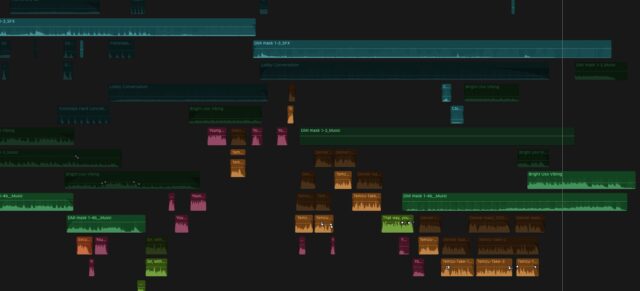
Role can also get pretty messy – Audio lanes help, but it would be good to be able to export easily to edit in Logic or some such… No idea if this is possible…
-

Oliver Peters
December 18, 2020 at 9:25 pmThe way to deal with tweaks like that is to compound the project first. Then you can apply effects to an entire lane/role. In the scenario of assigning dialogue, music, effects roles, you would then effectively have 3 submaster lanes and could apply separate effects to each. Unfortunately it gets more complicated if you also need to apply master effects, but then dive back into an individual clip to make some adjustments to it. That’s one of the reasons a “roles mixer” is something many folks have been asking for.
-
Oliver Peters
December 18, 2020 at 9:28 pmYou can get to Logic via FCPXML. Export an FCPXML for the project, open Logic Pro and import it there. Then bounce out the final mix or stem tracks to manually re-import into FCP. The caveat is that any speed adjustments made to sound in FCP (which FCP can handle) will not be adjusted in Logic Pro. So a “varispeed” effect with automatic pitch correction (which is what FCP is doing) has to be re-created in Logic.
-

David Battistella
December 23, 2020 at 8:20 amThe other option is to use X2Pro and convert your FCP X XML to an AAF file for import into Logic, which in my experience has been a smoother pathway and gets you all of the audio rather than the bounced tracks.
Reply to this Discussion! Login or Sign Up