Creative Communities of the World Forums

The peer to peer support community for media production professionals.

Activity Forums VEGAS Pro video doesnt show w/.avi file

  • video doesnt show w/.avi file

    Posted by Beatinyou on February 4, 2007 at 3:24 pm

    I have a canon power shot camera, and when i remove the pictures and video from it, everything goes smoothly. However, when i try to pull the .avi files into vegas, only the audio appears. Is there a new avi plug-in that i have to download? The .avi’s play just fine in Winamp.

    By the way, i have vegas 6c

    Your help is greatly appreciated!

    Edward Troxel replied 19 years, 6 months ago 5 Members · 5 Replies
  • 5 Replies
  • Rick Mac

    February 4, 2007 at 6:51 pm

    The problem is that you are missing the required codec.
    Avi is simply a wrapper around your codec.
    I do remember a thread not to long ago with the same situation,
    an avi from a digital camera. I believe that Edward Troxel has
    fielding the codec needed question.

    You can google for a free app called gspot. It will analyze your
    avi file and tell you what codec the file requires. From there google
    the codec, download, and install. Then Vegas can read your avi video file.

    Regards, Rick.

  • Mike Kujbida

    February 4, 2007 at 10:44 pm

    Edward does indeed have the tip on his site.
    How do I open AVI files create by still cameras?

  • Beatinyou

    February 11, 2007 at 5:19 pm

    Thank you guys for all of your help!, and I will try to do better research before I post something.

  • Kensuke

    February 18, 2007 at 3:32 pm

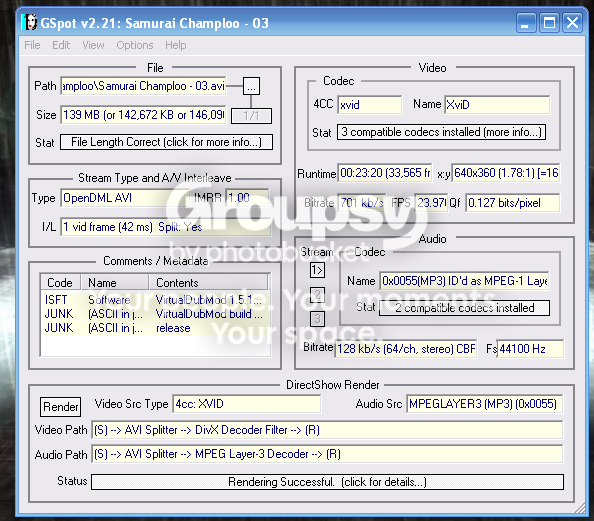
    I also am having a problem getting my video portion to show in Vegas. But the video I’m importing is in Xvid/DivX format, and from what I hear this type of file is not compatable with Vegas. If true, is there nothing I can do to fix it? I can’t reformat the videos, because it makes the files larger and I’m already low on space as it is. I tried the Morgan Multimedia, and while t does help my camera files, it doesn’t allow me to view my other Avi DivX files. I used Gspot as well, here is a pic.

  • Edward Troxel

    February 18, 2007 at 7:35 pm

    Do a search here for XVid and DivX. That should point you to the necessary information to get it working.

    Edward Troxel
    JETDV Scripts

We use anonymous cookies to give you the best experience we can.
Our Privacy policy | GDPR Policy