Creative Communities of the World Forums

The peer to peer support community for media production professionals.

Activity Forums VEGAS Pro Vertical lines appear on rendered video

  • Vertical lines appear on rendered video

    Posted by Bruno Cortés on August 31, 2021 at 1:42 pm

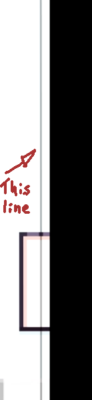
    Hi, I am editing a video in sony vegas 17 in which I am trying to make a handshake effect, so I used the saphire pluggin s_shake to simulate it and it seemed to work pretty well until I rendered and noticed this lines

    Here is a small clip of the video where you can watch the lines in action : https://drive.google.com/file/d/1t-g58dhyZQ3K65R_EuZKg1nhFEFNesYS/view?usp=sharing

    This lines seem to appear to be on the place that the camera would be if I did not used the s_shake effect, specially on the left and right sides of the screen.

    I ‘ve been looking for a solution to this problem and I don’t seem to find anything about it, so that’s why I’m here looking for help.

    I am using a computer with an nvidia 1060.

    An intel I7 and 16gb of ram.

    I am using a windows 10 machine,

    Thanks in advance and thanks for reading

    John Bolton replied 4 years, 8 months ago 2 Members · 3 Replies
  • 3 Replies
  • John Bolton

    August 31, 2021 at 2:52 pm

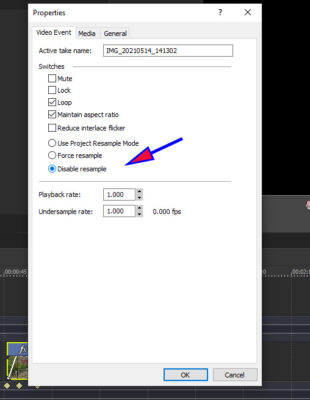
    Have you tried to Disable Sampling

    You can set your main properties with the Resample mode or on the time line with opposite mouse on the item that is causing the problem. This effect always seems to happen with animation.

  • Bruno Cortés

    August 31, 2021 at 3:41 pm

    Thanks John!
    I did try that before, and it did not work 🙁
    Do you have any other idea of what might be causing the lines to appear?

  • John Bolton

    September 1, 2021 at 7:28 am

    Did you apply it to all the fast moving animation. ? Can think what else it could be at the moment.. Is the moving figure an animated Gif?

We use anonymous cookies to give you the best experience we can.
Our Privacy policy | GDPR Policy