Creative Communities of the World Forums

The peer to peer support community for media production professionals.

Activity Forums Maxon Cinema 4D UV mapping

  • UV mapping

    Posted by Chad Demoss on August 11, 2021 at 10:50 pm

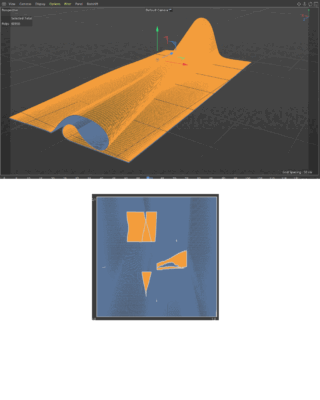
    I know the very basics of UV mapping but haven’t had to do anything to complicated. Now I have ran into something I have no idea what to do. None of the projections help me much attached is a photo of the surface I need to map. I watched a couple tutorials but they didn’t seem to solve my issue.

    Justin Thomson replied 4 years, 9 months ago 2 Members · 6 Replies
  • 6 Replies
  • Justin Thomson

    August 12, 2021 at 3:08 pm

    Seems like it would just be a plane if unwrapped, what kind of texture would you like to apply?

  • Chad Demoss

    August 12, 2021 at 4:26 pm

    Thanks for your reply Justin
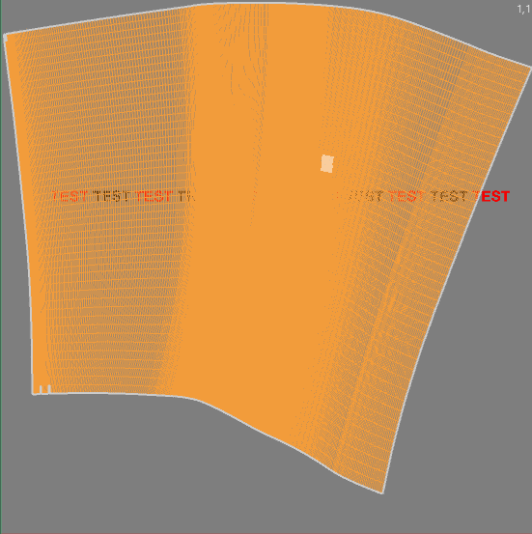
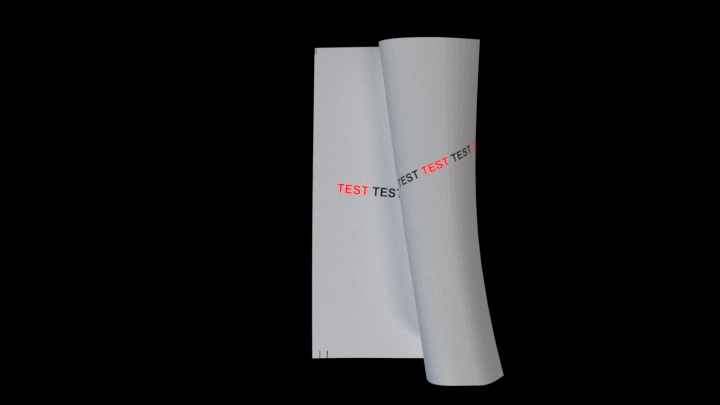
    I watched another tutorial and I was missing a part of unwrapping and now it’s better but how do I straighten it out? I’m going to put a bunch of text on the plane. attached is where i’m at you can see the text and map is warped.

  • Justin Thomson

    August 13, 2021 at 2:53 pm

    Looks correct to me, if the “paper” is not flat the text will not be either. Can you send the c4d file?

  • Justin Thomson

    August 13, 2021 at 3:23 pm

    Looks correct to me, if the “paper” is distorted the test should be too. Can you send the c4d file?

  • Chad Demoss

    August 17, 2021 at 6:32 pm
  • Justin Thomson

    August 19, 2021 at 3:13 pm

    Looks all good to me, the texture is bending with the model as it should.

We use anonymous cookies to give you the best experience we can.
Our Privacy policy | GDPR Policy