-
Using the Y value as the Source Text of a layer, but with a different value
Hello everyone!
I’m working on a sniper game and I need to create some simple UA Video Campaigns on Meta and Google Ads. As I need to have the same video on 3 different aspect ratios, I decided to precomp all my animations and HUD elements, so I can edit them just one time and place where I need.
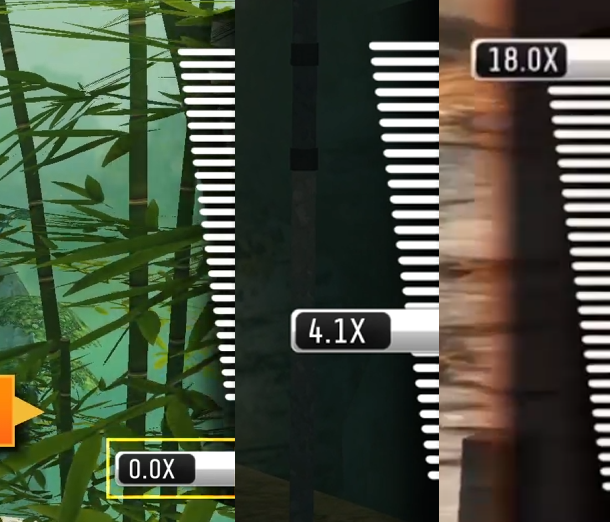
This part of the HUD[image 1] is attached to the right side of the screen and shows the scope zoom value, in this case it goes from 0.0X to 18.0X, it also only shows one decimal number and “x”(0.1x, 0.2x… 17.8x, 17.9x, 18.0x). Sometimes the maximum value can be 20.0x or 100.0x, depends on the video. I’m gonna set the value it manually depending on what is happening on the video.
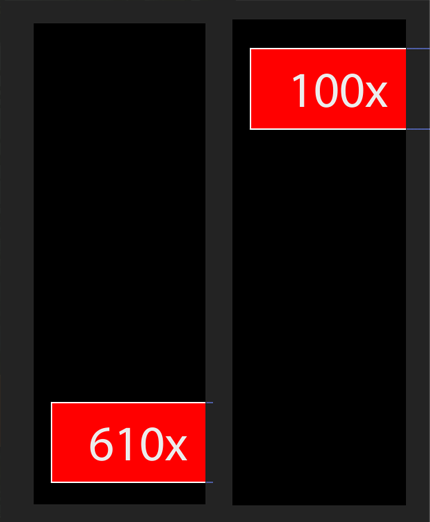
Right now I’ve attached the Y value to the number actually shown on my text layer. So I attached the Y value of my RED RECTANGLE to the text layer’s source text. At the start the Y value of my rectangle is 610 but I want it to 0.0x and in the maximum position the Y value is 100 and I want it be 18.0x. My comp is 250×700 pixels.
I’m just using this on the Souce Text: thisComp.layer(“RED RECTANGLE”).transform.position[1]+”x”;
What I need is to transform the Y value into a minimum of 0.0x and a maximum of 18.0x, so when the rectangle gets higher the value also gets higher and when the rectangle is on the start position the value is 0.0x, so it proportionally increases from 0.0x to 18.0x instead of getting the actual Y value that’s 610 and 100.
Thanks in advance, you guys have always been very helpful!