Creative Communities of the World Forums

The peer to peer support community for media production professionals.

Activity Forums Adobe After Effects using plugins VC element 3d with VC orb ??

  • using plugins VC element 3d with VC orb ??

    Posted by Ali Brakat on October 19, 2020 at 8:13 am

    Hi,
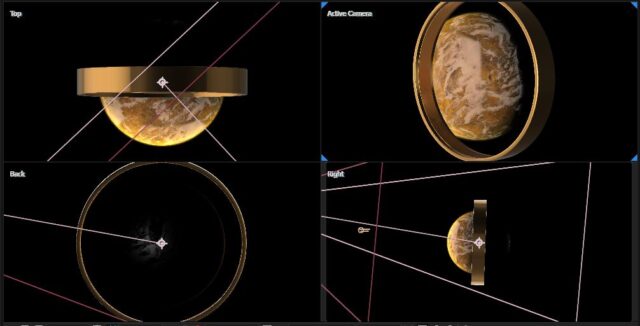
    I am working on this planet scene and I used the videocopilot plugin ORB to generate the planet,
    then I wanted to Use a 3d object in my scene too, so I used element 3d to use it it’s a simple object (a ring) so i thought I would do it in AE
    now the 2 objects when trying to use a camera and move a round them ( the ring is around the planet) seem to be in two different layers if I place then in the center and rotate the camera the ring doesn’t look to be around the planet
    I know I can use the element 3d to make the planet too and I did but the Orb plugin really gives me a much better result and control on the planet and looks much better detailed when I zoom in on it
    does anyone here use the 2 plugin and maybe know if there is a way to use the Orb plugin with element 3d?
    or any suggestion of how to best do this scene in general ( simple camera animation mostly)
    Graham Quince replied 5 years, 9 months ago 2 Members · 1 Reply
  • 1 Reply
  • Graham Quince

    October 19, 2020 at 8:29 am

    I don’t think there is a way directly, but… you could duplicate your orb layer or element layer and use it as an alpha matte for the other.

    Alternatively, I have a couple of tutorials for making a planet in Element and adding an atmosphere:

    Makin’ planet Mercury using Video Copilot Orb or VC Element 3D:

    https://youtu.be/s11UuctE6HU

    Adding an Atmosphere to a planet using Video Copilot Element 3D: https://youtu.be/InwQg1SVCE8

    Some contents or functionalities here are not available due to your cookie preferences!

    This happens because the functionality/content marked as “Google Youtube” uses cookies that you choosed to keep disabled. In order to view this content or use this functionality, please enable cookies: click here to open your cookie preferences.

We use anonymous cookies to give you the best experience we can.
Our Privacy policy | GDPR Policy