-
Using Essential Graphics to Switch Between Layers
Hey there!
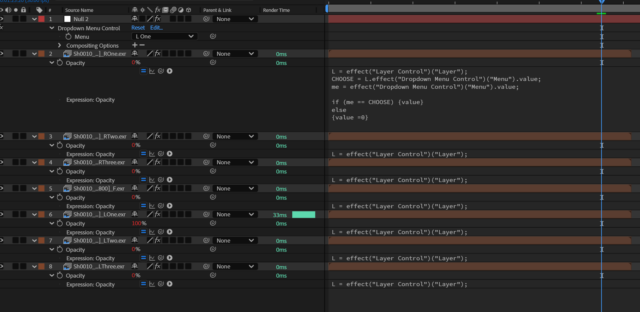
I have a project which requires outputting several videos for different screens, each being a different view of a scene. Imagine a 360 VR experience but shown on screen on walls.
I am currently using essential graphics to control a menu switch which then sets a certain layer’s opacity to 100 depending on which view needs to be rendered. The problem I am having is the render times. IT IS TAKING FOREVER to render as AE seems to be evaluating the layers that are set to 0 opacity. The reason I set up this system is so that I can have one master comp, where I can alter in & out points and it updates every screen, as they all use a mastercomp with a different menu switch option set by essential graphics.
I’m looking for ideas on how to output 7 different screens that all need the same timings but require different layers for rendering. I have a system that works, but because I’m using OpenEXR, it is just not very performant at all, and I suspect even though only 1 layer is visible, it is still processing all 7.
All help appreciated,
Tom replied 1 year, 1 month ago 2 Members · 1 Reply