

Activity › Forums › Adobe After Effects Expressions › Using bounding box in extendscript (and using it to create a mask path)
-
Using bounding box in extendscript (and using it to create a mask path)
Posted by Emre Mutlu on June 28, 2022 at 6:52 pmHi there,
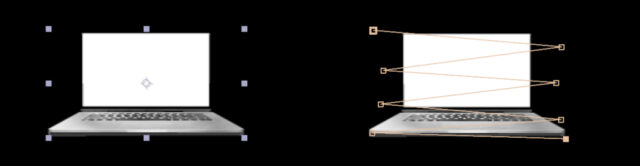
Can i reach a layer’s bounding box via ExtendScript? I can explain what i’m trying to do with those steps :
– Import a vector drawing in a comp
– Get the bounding box of this layer to create mask path within it
I’ve added a screenshot to illustrate it.
 Emre Mutlu replied 4 years, 2 months ago 2 Members · 4 Replies
 -
4 Replies
-

Dan Ebberts
June 28, 2022 at 9:15 pmAre you talking about scripting or expressions? With expressions you would just click on your vector layer with the pen tool to create a mask point and add an expression something like this to the Mask Path:
r= sourceRectAtTime(time,false);
p = [[r.left,r.top],[r.left+r.width,r.top+r.height/5],[r.left,r.top+2*r.height/5],[r.left+r.width,r.top + 3*r.height/5],[r.left,r.top+4*r.height/5],[r.left+r.width,r.top+r.height]];
createPath(p,[],[],false)
It would be similar but a little more involved with scripting.
-

Emre Mutlu
June 28, 2022 at 9:49 pmThank you Dan. I tried your way and it worked.
I was talking about scripting. I post here because can’t find a scripting topic. How could i do it with script? Could you please explain the logic in this so that i can understand it 🙂 Also is there a way to create the mask point without using pen tool?
-
Dan Ebberts
June 28, 2022 at 10:54 pm<div>The script version would be like this:</div>
var myLayer = app.project.activeItem.layer(1);
var r = myLayer.sourceRectAtTime(0,false);
var myMask = myLayer.property("Masks").addProperty("Mask");
var myPath = myMask.property("Mask Path");
var myShape = myPath.value;
myShape.vertices = [[r.left,r.top],[r.left+r.width,r.top+r.height/5],[r.left,r.top+2*r.height/5],[r.left+r.width,r.top + 3*r.height/5],[r.left,r.top+4*r.height/5],[r.left+r.width,r.top+r.height]];
myShape.inTangents = [];
myShape.outTangents = [];
myShape.closed = false;
myPath.setValue(myShape);
Basically you’re just using the layer’s left, top, width, and height extents as provided by sourceRectAtTime() to calculate where you want the mask vertices to be. I just took a shot at it based on your diagram. Since the mask is all corner points, you can provide empty arrays for the in and out tangents.
Reply to this Discussion! Login or Sign Up