

Activity › Forums › Apple Final Cut Pro › US Map with Pin Markers Plug-in in FCPX
-
US Map with Pin Markers Plug-in in FCPX
Posted by Greg Ball on July 7, 2021 at 5:42 pmHi all,
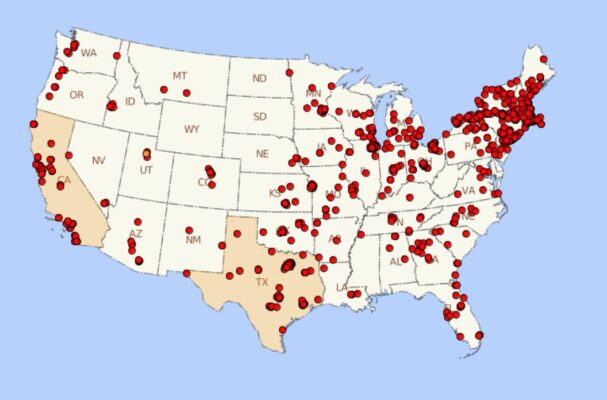
Do you know of a plugin that includes a animated USA Map and also has the ability to drop in pin markers in various states? Something similar to the image I’ve attached.
I know I can probably build this by hand, but the part of my script where this is mentioned is only 1 line. It’s not worth the hours needed to create this from scratch. Thanks so much!
 John Fishback replied 5 years, 2 months ago 5 Members · 8 Replies
 -
8 Replies
-

Patrick Donegan
July 7, 2021 at 6:09 pmSounds like a good excuse to learn Motion and what that can do.
One can add a map to the frame.
a
and then one can add a pin drop
and then another.
-

Mark Suszko
July 7, 2021 at 8:31 pmMotionVFX might have something for this.
I’d second the suggestion of Apple Motion. What I’m thinking is: it has a 3-d particle generator effect set that is pretty easy to use. And it has image wells. So…
…Create one emitter on your map. Put a push pin in the image well of the emitter as a source, with an alpha channel. Set the emitter parameters to make just one image and give it a path or a behavior of floating straight up. Group that emitter and Copy/paste this emitter group all over the map wherever you need it, offset the timing slightly if you want a nicer effect. Render the pins flying up off their spots, then just reverse the resultant clip to have them falling into place. But that’s how my head works. There are probably other, more elegant ways – that’s just the first idea that came to me.
You don’t technically need the emitter either, or Motion, you can do this in FCPX, if you just create one clip of a keyframed pin drop, right on the timeline, you can copy/paste it into place with a key effect and use the positioning tool on the FCPX timeline to offset and target each landing spot with starting and ending keyframes. If you have a lot of pins, you may need to do it in stages or make compound clips or sub-renders to manage the processing overhead. But it’s quite doable. I’d prefer doing it in Apple Motion because the 3-d virtual camera can add interesting camera moves to the entire sequence.
-

John Fishback
July 7, 2021 at 9:48 pmPixel Film Studios has an animated map effect. It’s not 3D, but check it out. https://store.pixelfilmstudios.com/product/promap/
-

Mikael Demel
July 8, 2021 at 8:43 amHi Greg,
With that huge amount of pins and the minimal amount of time in the film, why not just make a simple transition between two pictures, one empty and one with markers.
With a new plug-in, You’ll end up with hours before it’s set and done anyway.
Goid luck!
Demel
-
John Fishback
July 9, 2021 at 7:00 pmI haven’t used the plugin, but I saw a pin in an image on their website’s description of the plugin.

Reply to this Discussion! Login or Sign Up