

Activity › Forums › Adobe After Effects › Unmult plugin for old AE comp (AE CS 5.5)
-
Unmult plugin for old AE comp (AE CS 5.5)
Posted by Quen Hoai on September 17, 2020 at 8:43 amHi all,
I need reopen a comp, which made in AE CS 5.5 and have apply Unmult plug-in. I always get the error message Unmult even though I have installed Unmult (2019) for AE CS 5.5.
What wrong for me and How can I fix it?
Thank for your advice.
Quen Hoai replied 5 years, 10 months ago 5 Members · 9 Replies -
9 Replies
-

Michael Szalapski
September 17, 2020 at 11:59 amWhy not just replace the instances of the old effect with the one you have installed?
-

Quen Hoai
September 17, 2020 at 1:25 pmThank for your answer and I tried but maybe unmult not support for AE 2018 on window 10. Did you have any other advice?
-

Walter Soyka
September 17, 2020 at 1:39 pmWhat exact version of Unmult have you installed (there are a number of them, maybe you can provide a link to the one you’re using)?
What exact error message do you get?
-

Kevin Camp
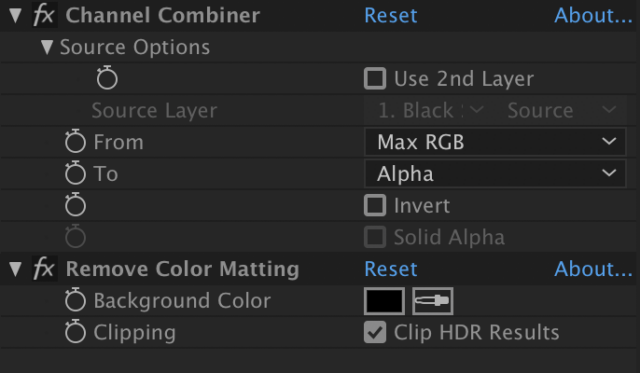
September 17, 2020 at 10:07 pmYou could try replacing Unmult with a couple standard effects.
This is what I started using when Unmult stopped being free briefly about a decade ago.

-
Walter Soyka
September 17, 2020 at 10:36 pmGood call, Kevin. I actually wrote a script a few years back to “UnUnmult” a project, replacing the Red Giant effect with a couple of different options:
-

Chris Wright
September 22, 2020 at 8:30 amJust roll your own. It does the same thing and work in any AE version.
To use the Set Matte effect you need to first pre-compose your lens flare on the black solid layer and move all attributes to the new pre-comp.
Then apply the Set Matte effect to the pre-comp in your main comp and change the “Use For Matte” property to luminance or lightness.
Then change the pre-comp’s blend mode to “Luminescent Premul.”
Reply to this Discussion! Login or Sign Up