Creative Communities of the World Forums

The peer to peer support community for media production professionals.

Activity Forums Adobe After Effects “Unfolding” A body in 3D

  • “Unfolding” A body in 3D

    Posted by Aiden Locke on November 3, 2020 at 7:54 pm

    A bit of an odd question but I was hoping for some advice from the experts on how to achieve a specific effect I’ve dreamed up:

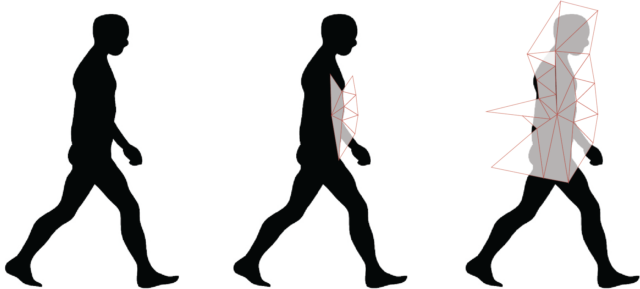
    The idea is to use basic footage (say of a person walking), and slowly break them down into triangles, with each triangle working as a sort of mask of some part of the original footage. These triangles would unfold from a central point, appearing almost out of nowhere.

    My first thought was to create ~50 video layers of the same footage, each masked to a small triangular region of the footage (I would use basic tracking to ensure the mask stays within the specified region of the subject). Then pre-comp each of these masks, and animate them so that they can unfold and fold as I’m describing. I feel that this is a very clunky and time-consuming way to do things… SO any ideas or advice would be really appreciated, I’ll begin with this method and share my results.

    I’ve attached a mockup of what I’m going for in case the text wasn’t too clear.. cheers!

    Graham Quince replied 5 years, 6 months ago 3 Members · 2 Replies
  • 2 Replies
  • Brendon Murphy

    November 3, 2020 at 9:17 pm

    Apart from using a 3D character or attempting to project your character onto 3D geometry, you could give the Lockdown plugin a shot. You would use Lockdown to stabilize the core body movement, add your triangle distortions, and then unstabilize to restore the original body movement. Check out the 40 sec mark here: https://www.youtube.com/watch?v=auqr4rDLXtwYou

    You can even use lockdown to map the body contour in 3D space and send it to a 3D app for distortion. That’s shown here: https://www.youtube.com/watch?v=FV6aqbEnt2g

    Some contents or functionalities here are not available due to your cookie preferences!

    This happens because the functionality/content marked as “Google Youtube” uses cookies that you choosed to keep disabled. In order to view this content or use this functionality, please enable cookies: click here to open your cookie preferences.

  • Graham Quince

    November 4, 2020 at 10:15 am

    There’s a preset called Card Wipe Pixel Storm – it might be worth playing around with that to see if you can get that close.

    Alternatively, could you use the Shatter effect to break up the person? Thinking this through as I type:

    You could shatter the video layer, but set the gravity to zero, so the pieces remain in space. There’s a couple of triangle shapes already there. The Force 1 values can be keyframed, so you could animate it across the body. And if you pre-comp the effect, then time reverse it, the shattered parts will come together.

We use anonymous cookies to give you the best experience we can.
Our Privacy policy | GDPR Policy