-
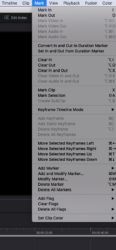
Under ‘Mark’ the Keyframe options are greyed out?
In paid for version of Resolve if I click ‘Mark’ at the top the Keyframe options are greyed out i.e. Add Keyframe, Add Static Keyframe etc, see image. It’s a drag as I add loads of keyframes for the audio volume to get volume to go up and down at certain points and I have to move the mouse over and click the tiny keyframe symbol each time, keyboard shortcut would be much quicker and easier but the keyboard shortcut does not work as Add Keyframe is greyed out and does not work. Suggestions?