Creative Communities of the World Forums

The peer to peer support community for media production professionals.

Activity Forums Adobe After Effects Expressions TypeMonkey versus word-by-word subtitles

  • TypeMonkey versus word-by-word subtitles

    Posted by Shaun Sweet on April 28, 2022 at 12:45 am

    I use TypeMonkey, the Rolls Royce for creating whizz bang captions, but recently a client wanted *subtitles* animating in the in vogue word-by-word fashion. Whilst TypeMonkey can do this, it’s overkill for the job – needs a lot of setup outside Ae for the marker track and it takes a long time realign each line into the lower subtitle position.

    I then explored a different route – I can import the .srt directly into After Effects using a script which produces a single text layer, with all the subtitle text lines keyframed at the corresponding timecode for the start of each line for the entire comp; I also have this Source Text expression by Dan Ebberts which reveals each word in the line depending on a Slider value:

    s = effect(“Word-by-word”)(“Slider”).value;
    str = “”;
    txt = value.split(” “);
    for (i = 0; i < Math.min(txt.length,s); i++){
    str += (i > 0 ? ” ” : “”) + txt[i];
    }
    str

    Stage 2: I ran a (Dan Ebberts!) Text to Markers script on the text layer to create (named) markers whenever there’s a Source Text keyframe, which puts a marker at the beginning of every subtitle line on the entire layer; if I play back the timeline along with the source layer audio, I can then use the * key to manually add additional markers for each subsequent word on the text layer.

    What I’d like to do is add an expression to Slider Control that firstly looks at the Source Text properties, and returns a value of 1 if there’s a Source Text keyframe there. If there’s no Source Text keyframe, the expression looks for a marker and will increment a value by 1 for each marker. NB. I recognize that expressions have no memory, but I have a further expression in my back pocket that returns the number of words for each Source Text keyframe. So I wonder if there’s a way to use the running marker Index number and subtract a derived value from the ‘word total’ if necessary? NB. If necessary (via Sonix) I can additionally produce a .srt file that has the timecode for every word).

    Thank you for your time ladies and gentlemen.

    Shaun Sweet replied 4 years ago 2 Members · 8 Replies
  • 8 Replies
  • Dan Ebberts

    April 28, 2022 at 7:28 pm

    It’s hard to picture exactly what you’re after. Maybe you could describe that a little more (rather than focus on the tools you have tried).

  • Shaun Sweet

    May 2, 2022 at 8:36 am

    Thanks for your reply Dan.

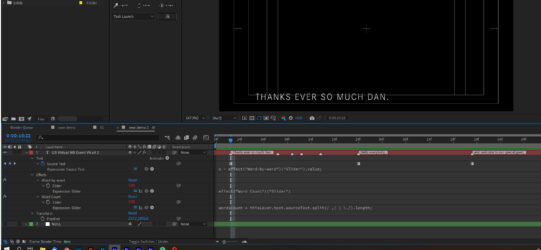
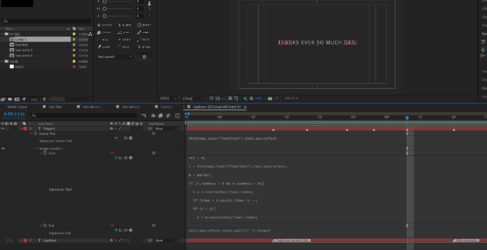
    For any given line of Source Text keyframed on a text layer, I’d like to be able to build it word by word, timed using markers that I put on that text layer or a null. I’ve attached a grab; the first word of each subtitle already has a marker, and I’ve manually added extra markers where I’d like the remaining words to appear. When the next Source Text keyframe appears, I’d like the new line of text to build again. So in the example, for the line “Thanks ever so much Dan.”, the complete line would build timed with the first 5 markers. The next line “Hello Everybody”, would build with 2 more markers.

    Many thanks again

  • Shaun Sweet

    May 2, 2022 at 8:56 am

    Also to clarify, each subtitle is a single line of text and the next subtitle appears where the previous subtitle was. The effect is a bit like when you see live subtitling on a news prog, each word appears after the last, then the whole line disappears when the next line starts.

  • Dan Ebberts

    May 2, 2022 at 4:28 pm

    I’m not sure this is exactly right, but it should be close:

    str = "";

    m = marker;

    if (numKeys > 0 && m.numKeys > 0){

    k = nearestKey(time).index;

    if (time < key(k).time) k --;

    if (k > 0){

    n = m.nearestKey(time).index;

    if (time < m.key(n).time) n--;

    if (n > 0){

    nCount = 0;

    nTemp = n;

    while (nTemp > 0 && (m.key(nTemp).time >= key(k).time)){

    nCount++;

    nTemp--;

    }

    if (nCount > 0){

    txt = value.split(" ");

    str = txt.slice(0,nCount).join(" ");

    }

    }

    }

    }

    str

  • Shaun Sweet

    May 2, 2022 at 5:00 pm

    That’s incredible, thank you so much for your swift response – amazing! I’ve learned such a lot from you.

    There’s probably no way round this but I’ve now noticed that if I import the subtitles centred in the frame, After Effects centres each partial line as the the line builds – so with each new word the line jumps around as it gets centred. If it’s Left Justified then it’s fine as the words build on progressively from left to right.

    Is there a way to have each line centred based on the full line length, and still build it word-by-word without each partial line being re-centred?! Really appreciate any ideas for this!

  • Dan Ebberts

    May 2, 2022 at 6:52 pm

    Instead of applying the expression to the source text, you could use the same concept, but use an opacity animator. Set the opacity of the animator to 0%, In the Advanced section of the range selector, set Units to Index and Based On to Words, and set Smoothness to 0%. Apply this expression to the End property:

    text.sourceText.value.split(" ").length

    and this expression to the Start property:

    val = 0;

    t = text.sourceText;

    m = marker;

    if (t.numKeys > 0 && m.numKeys > 0){

    k = t.nearestKey(time).index;

    if (time < t.key(k).time) k --;

    if (k > 0){

    n = m.nearestKey(time).index;

    if (time < m.key(n).time) n--;

    if (n > 0){

    nCount = 0;

    nTemp = n;

    while (nTemp > 0 && (m.key(nTemp).time >= t.key(k).time)){

    nCount++;

    nTemp--;

    }

    val = nCount

    }

    }

    }

    val

    Something like that.

  • Shaun Sweet

    May 2, 2022 at 9:10 pm

    Ah yes, this is perfect – I did see the opacity trick somewhere when I was hunting around!

    I’m so grateful for your time in helping me with this. It’s a truly elegant solution.

    All the very best…Shaun

  • Shaun Sweet

    May 3, 2022 at 12:43 pm

    At the risk of gilding the lily, I’m also looking at using the marker comment property to generate the subtitle text instead of Source Text keyframes, i.e:

    marker.nearestKey(time).comment

    This method has the advantage that the entire Captions layer can be reformatted in one go – also some subtitle importers create the text only in the marker comments. The problem with using markers to supply the text is that my ‘trigger’ markers mess things up (i.e. the ’empty’ ones I add manually with the asterisk to advance the text word-by-word) – the expression obviously can’t distinguish between a ‘text marker’, and a ‘trigger marker’:

    val = 0;

    t = thisComp.layer(“Captions”).text.sourceText;

    m = marker;

    if (t.numKeys > 0 && m.numKeys > 0){

    k = t.nearestKey(time).index;

    if (time < t.key(k).time) k –;

    if (k > 0){

    n = m.nearestKey(time).index;

    if (time < m.key(n).time) n–;

    if (n > 0){

    nCount = 0;

    nTemp = n;

    while (nTemp > 0 && (m.key(nTemp).time >= t.key(k).time)){

    nCount++;

    nTemp–;

    }

    val = nCount

    }

    }

    }

    val

    BUT if I create a secondary ‘Triggers” layer for all the manual word-by-word triggers, the current Start property expression is looking for a keyframe on the Captions layer, and the value keeps climbing instead of resetting every time there’s a new text marker. However the end property expression returns the correct value for any given subtitle:

    text.sourceText.value.split(” “).length

    Apologies in advance for this bonus challenge!

We use anonymous cookies to give you the best experience we can.
Our Privacy policy | GDPR Policy