

Activity › Forums › Adobe After Effects › twixtor help
-
twixtor help
Posted by Jocelyn Ximinez on March 11, 2026 at 10:14 pmHello, I wanted to know if anybody would be willing to recreate/help me recreate someone elses twixtor ? I’ve tried and It comes out looking choppy and ugly and im not sure what else to do 🙁
John Martinreplied 6 months, 1 week ago 2 Members · 5 Replies
-
5 Replies
-

John Martin
March 12, 2026 at 10:59 amhey man! yes i can do this for you, can you send me the video you want to learn how to do?
-

Jocelyn Ximinez
March 12, 2026 at 11:24 amthank you so much ! i’m pretty sure they’re using 3 keyframes, and the first one seems to be the highest speed out of the three, but that’s about as far as i’ve figured out. I’ve tried messing around with different graphs and speeds but I can’t seem to get it to look the same and as smooth (the video is 23.976fps) ^^
-
John Martin
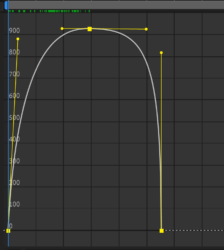
March 12, 2026 at 2:29 pmyes he’s using 3 keyframes, you need to recreate this curve for every single triplet, copy this image in your Flow Plugin and it will work 100%.
-
Jocelyn Ximinez
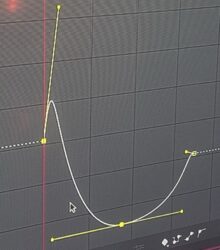
March 13, 2026 at 12:07 amThanks for the explanation and the graph. I tried recreating the curve you sent in flow and applying it but mine still doesn’t end up looking like the reference edit🥲
the shape ive been getting is definitely similar, but the graphs or twixtor speed don’t seem to match what’s happening in the edit. It feels like im close but something about the graph values or the exact curve shape is a bit different?
-
John Martin
March 13, 2026 at 6:09 ami make those edits as a job every day, and with the curve i sent it looks perfect, at this point i can grant you it’s simply something off with your footage, twixtor is not needed for cuts as fast as those because the necessary frames as so few. keep grinding, good luck.
Reply to this Discussion! Login or Sign Up