

-
Turned on a little label accidentally?
Small
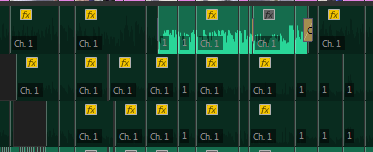
question. I accidentally pressed a hotkey I think. Every little clip that’s got the space for the label now says “Ch. 1”. Anyone know how to turn it off? I can’t find it in any of
the settings. Thanks!

Small
question. I accidentally pressed a hotkey I think. Every little clip that’s got the space for the label now says “Ch. 1”. Anyone know how to turn it off? I can’t find it in any of
the settings. Thanks!
We use anonymous cookies to give you the best experience we can.
Our Privacy policy | GDPR Policy