Creative Communities of the World Forums

The peer to peer support community for media production professionals.

Activity Forums Adobe After Effects Try to Understand how this effect is done

  • Try to Understand how this effect is done

    Posted by Franck Mony on August 21, 2025 at 8:33 am

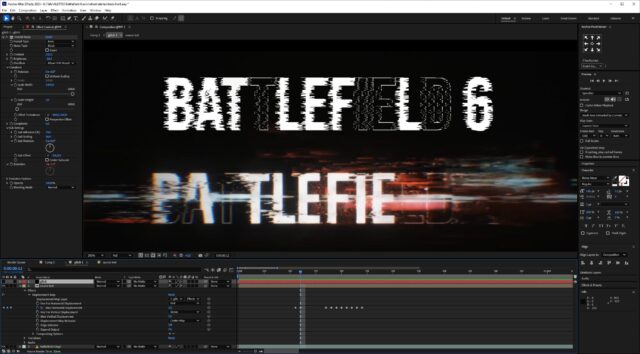
    Hello, i would like to do the same glitch effect that there is on the battlefield6 logo.
    I added a displacement map of the glitch layer (with fractal noise) on my font layer, as you can see in the attachement, the original logo (bottom) as not the glitch effect everywhere, only on some part on each letter, somes seems almost not affected by the glitch (letter E or F). Also glitch affect only the left side of letters (letter T).
    On my test, displacement map affect font everywhere, how to add effect only on some part of the typo like in original logo ?

    John Martin
    replied 8 months, 3 weeks ago
    2 Members · 3 Replies
  • 3 Replies
  • John Martin

    August 21, 2025 at 11:43 am

    yo Frank i recorded a custom tutorial for you with the solution, enjoy!

    https://youtu.be/MB4cji2JfwI

  • Franck Mony

    August 21, 2025 at 1:13 pm

    Hello John, nice, thx you very much, and very instructive to add mask directly with the + button
    I’ll try this !!

  • John Martin

    August 21, 2025 at 3:14 pm

    you’re welcome! For more help don’t hesitate to dm me! 🔥

We use anonymous cookies to give you the best experience we can.
Our Privacy policy | GDPR Policy