

Activity › Forums › Adobe After Effects Expressions › Trigger an action by luminance
-
Trigger an action by luminance
Posted by Kashif Nawaz on January 19, 2023 at 10:52 amHello there,
Firstly, I’m not an expressions specialist (like most of you).
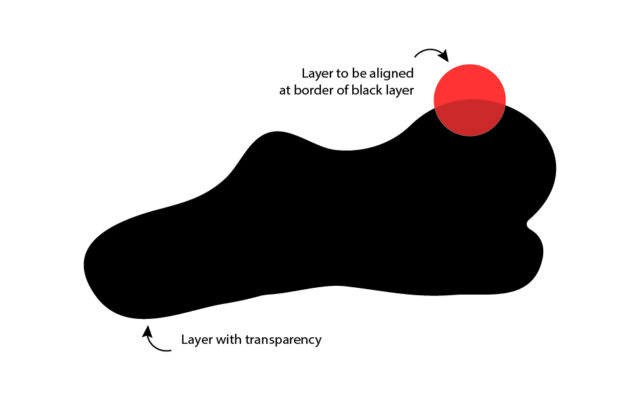
I have one opaque object (black layer as shown in the image) and would like another object (red circle) to be centered at the edge of the black layer where it goes transparent. The attached image is only for reference. I want it to be done automated and not manually. If this can be achieved without expressions, it would be great. But with expressions, even better.
Thanks
 Filip Vandueren replied 3 years, 8 months ago 2 Members · 6 Replies
 -
6 Replies
-

Filip Vandueren
January 19, 2023 at 11:48 amBy automated, do you mean that running auto-trace on the image and then using the resulting mask is not an option ?
It would need to automatically fit on a shape if something new is dropped in the comp ?
-

Kashif Nawaz
January 19, 2023 at 12:25 pmI may have overcomplicated things here. Auto-trace is not an option.
I want the center of the red circle to be placed at the edge of the black shape. I believe this can be achieved by ‘sampleImage’ to determine the luminosity of the black layer and applying to the position of red circle. Hope this makes sense.
-
Kashif Nawaz
January 19, 2023 at 12:54 pmThe red circle is not supposed to be moving along the edges or along any path. It will simply sit there or on any other side (right/left/top/bottom etc.).
-
Filip Vandueren
January 19, 2023 at 2:06 pmAnd where along the shape should it be ? Random ? At a certain angle ? At a certain X-position ?
-
Filip Vandueren
January 21, 2023 at 3:13 pmHi Kashif,
here’s a slight adaptation of an expression I posted a few days ago which will do what you need:
// posterizeTime(0); // uncomment for still images
includeEffects = false;
l=thisComp.layer("Blob"); // your layer
w=l.width;
h=l.height;
threshold = 0;
width_bits = Math.ceil(Math.log(w)/Math.log(2));
height_bits = Math.ceil(Math.log(h)/Math.log(2));
left = 0; right = 0;
seedRandom(index,true);
for (i=0; i<1000; i++) {
	// do a limited loop, because Blob might be empty and we would be stuck in an infinte loop.
	randomPos = random([0,0],[w,h]);
	if (l.sampleImage(randomPos, [1,1], includeEffects)[3]>0) break;
}
for (b=width_bits-1; b>=0; b--) {
    slice_width = 2**b;
    if (l.sampleImage([left + slice_width/2, randomPos[1]], [slice_width/2, 1],includeEffects)[3]<=threshold) {
        left+=slice_width;
    }
    if (l.sampleImage([w - (right + slice_width/2), randomPos[1]], [slice_width/2, 1],includeEffects)[3]<=threshold) {
        right+=slice_width;
    }
}
right= w-right;
top = 0; bottom = 0;
for (b=height_bits-1; b>=0; b--) {
    slice_height = 2**b;
    if (l.sampleImage([randomPos[0], top + slice_height/2], [1, slice_height/2],includeEffects)[3]<=threshold) {
        top+=slice_height;
    }
    if (l.sampleImage([randomPos[0], h - (bottom + slice_height/2)], [1, slice_height/2],includeEffects)[3]<=threshold) {
        bottom+=slice_height;
    }
}
bottom = h-bottom;
// choose a random direction
switch (Math.floor(random(4))) {
	case 0:
		[randomPos[0], top];
		break;
	case 1:
		[randomPos[0], bottom];
		break;
	case 2:
		[left, randomPos[1]];
		break;
	default:
		[right, randomPos[1]];
}
Reply to this Discussion! Login or Sign Up