

Activity › Forums › Adobe After Effects Expressions › Triangle scale fit Rectangle Shape Question
-
Triangle scale fit Rectangle Shape Question
Posted by Ilya Sire on October 9, 2020 at 3:38 amHi forum,
How to calculate triangle scale to fit rectangle width & height size?
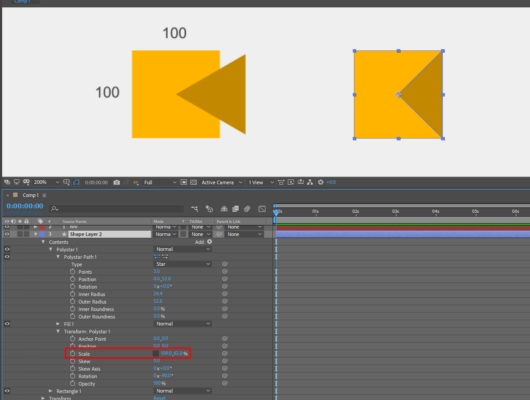
I attached sample image file (left) is default value of triangle, (Right) is the scale i wanted to fit the box, anyone can help this?
ilya
 Ilya Sire replied 5 years, 11 months ago 4 Members · 5 Replies
 -
5 Replies
-

Stephen Dixon
October 9, 2020 at 11:30 amThere are, as always a few ways you can do it. The best, most fun way is with maths.
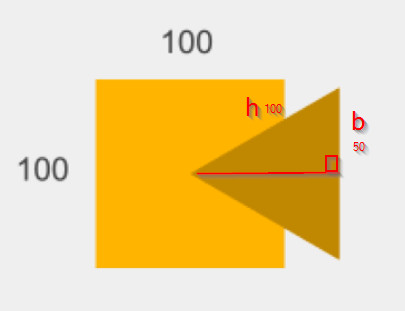
The default polystar triangle is an equilateral triangle. If we bisect it (cut in half, in this case along the horizontal mid-line) to make two right angle triangles, we have a triangle with a hypotenuse (h) the same length as the sides of the original, i.e. 100px long; a base (b, the one we cut in half) 50px and what we have to find is the length of the other side which we’ll call a.
Pythagoras tells us that h² = b² + a², so
a² = h² – b²
a = sqrt(h² – b²)
so that’s the original height of the triangle (you could also do it with trig, using 100*sin(60), because the angle of the top corner is 60°). We need to work out how to scale that so that it equals 50px. Or in other words we need to work out n, where
n*a = 50.
substituting the value for a we worked out earlier:
n*sqrt(h² – b²) = 50
so
n = 50 / sqrt(100² – 50²)
n= 0.57735026918962576450914878050196
Since it’s a scale, so in percentages, we need to multiply by 100
57.735026918962576450914878050196
in expressions that would be
let r = [link to rectangle x size, use the expressions pickwhip to get it];
100 * (r/2) / Math.sqrt(Math.pow(r, 2) - Math.pow(r/2, 2))
if you use the expression you don’t have to recalculate if the size of the rectangle changes.
The other way would be to convert the triangle to a bezier shape, then calculate the position of all the points.
let r = [link to rectangle size (x and y), use the pick-whip to get it];
let p = [[r[0]/2, 0 - r[1]/2], [r[0]/2, r[1]/2], [0,0]]
createPath(points = p, inTangents = [], outTangents = [], is_closed = true)
-

Filip Vandueren
October 9, 2020 at 11:49 amIf you don’t need the actual number of the scale for a different purpose, but just need a shape that has the right form, consider this:
Add a new Path to your Shape, give it this expression:
s=content("Rectangle 1").content("Rectangle Path 1").size;
createPath([ [0,0],[s[0]/2,s[1]/2],[s[0]/2,s[1]/-2] ],[],[],true); -

Tomas Bumbulevičius
October 9, 2020 at 10:18 pmStephen – just wanted to say that this is not the first thread where your responses just shines brightly! Well done and keep it coming 🙂
-

Ilya Sire
October 10, 2020 at 1:39 pmWow, thank you for your detailed explanation,
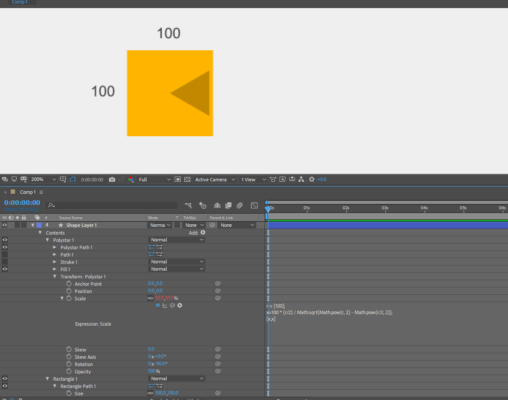
I tried 1st calculation and turn out, it gives 57.7% for X scale and I use it for Y as well because it uses the same values 100. And the triangle doesn’t fit to the rectangle. Where I did wrong in this calculation?
I found 2nd method is easier to understand and it worked.
Thanks for the helps! 🙂
-
Ilya Sire
October 10, 2020 at 1:41 pmThank you, Filip! I never thought to use this function before. 🙂
Reply to this Discussion! Login or Sign Up