

Activity › Forums › Creative Community Conversations › TouchBar utility…
-
TouchBar utility…
Posted by Bill Davis on November 3, 2016 at 2:36 pm
My friend Richard Taylor just posted a screen cap of the new Touchbar working with FCP X.
It obviously has the resolution to “iconize” even a decently complex timeline for scrubbing.Nice.
Those of you with a ” zillion connected clip” timelines? YMMV.
Time will tell.Creator of XinTwo – https://www.xintwo.com
The shortest path to FCP X mastery.Richard Herd replied 9 years, 10 months ago 7 Members · 11 Replies -
11 Replies

-

Douglas K. dempsey
November 3, 2016 at 5:40 pmI love the idea of my custom buttons on the bar, but ALSO built-in modes like the scrubber you show.
However, I do agree with the observation that: When not on the road, I have my MBPr on a stand, running a 24″ external LCD, and I use wireless keyboard, trackpad and mouse. Reaching up to use the Trackpad at that point … kinda feels like one of those keyboard players from ’70s prog rock bands, surrounded by multiple electronic keyboards!
It would be great to see an external keyboard with the Touchbar — an expensive proposition and there is likely not a large enough pool of users.
Would Apple allow a third party manufacturer to offer an external keyboard with this technology?
Doug D
-

Noah Kadner
November 3, 2016 at 6:28 pmI asked about the specs on the Touch Bar last week during the Creative Summit. It’s a 10-point multitouch touch screen measuring 2170×60 pixels. In terms of Final Cut Pro X that permits up to a 30 level high timeline display with essentially unlimited length. That is down to 1 pixel per level + 1 pixel for space in-between. It will be intriguing to see how different developers adapt to this new interface. Here are some examples:

Noah
FCPWORKS – FCPX Workflow
FCP Exchange – FCPX Workshops
XinTwo – FCPX Training -

Charlie Austin
November 3, 2016 at 7:15 pm[Douglas K. Dempsey] “It would be great to see an external keyboard with the Touchbar — an expensive proposition and there is likely not a large enough pool of users.”
If that was on an external keyboard I’d buy it yesterday. 🙂
————————————————————-
~ My FCPX Babbling blog ~
~\”It is a poor craftsman who blames his tools.\”~
~I still need to play Track Tetris sometimes. An old game that you can never win~
~\”The function you just attempted is not yet implemented\”~ -
Noah Kadner
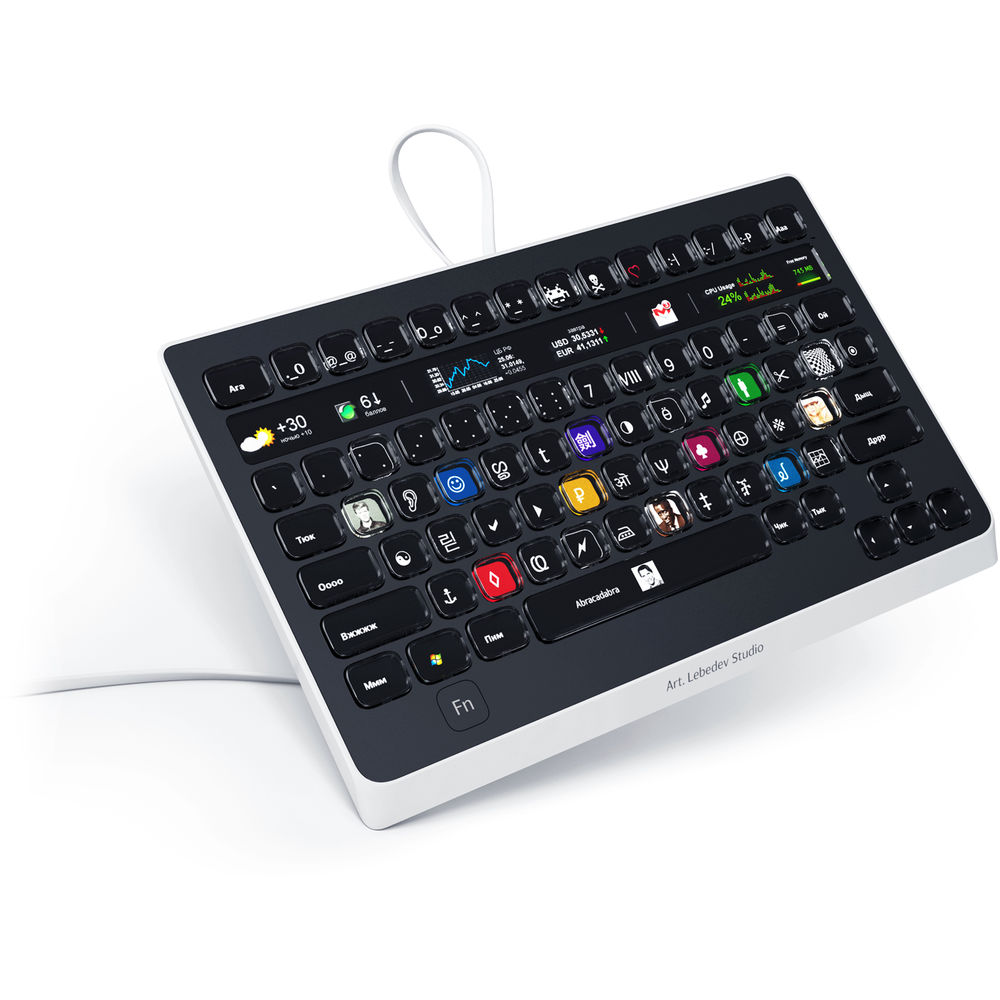
November 3, 2016 at 7:36 pmBut what would you be willing to pay? If it were third party it could easily cost as much as US $499 for the Optimus Popularis.
Noah
FCPWORKS – FCPX Workflow
FCP Exchange – FCPX Workshops
XinTwo – FCPX Training -
Douglas K. dempsey
November 3, 2016 at 7:44 pmNoah is right, that’s the problem. The number of likely customers would make it expensive.
I guess the only hope would be this train of thought: Apple, unlike Microsoft, is not soon going to make a full touch-screen MBP or iMac.
But testing the waters with the Touchbar, they might then decide to then make a Touchbar Wireless, so that iMac customers can get in on the fun.
That would be the item I would buy, for use with my iMac AND my MBP (I run FCPX on both).
Doug D
-
Charlie Austin
November 3, 2016 at 7:52 pm[Noah Kadner] “But what would you be willing to pay? If it were third party it could easily cost as much as US $499 for the Optimus Popularis.
“
Yeah, probably not that much if all I got was some editing shortcuts and a navigation slider. But if lots of apps, not just FCP X and the other few that were on board, start doing cool things with it (which they probably will) who knows…————————————————————-
~ My FCPX Babbling blog ~
~\”It is a poor craftsman who blames his tools.\”~
~I still need to play Track Tetris sometimes. An old game that you can never win~
~\”The function you just attempted is not yet implemented\”~ -

Richard Herd
November 3, 2016 at 10:25 pmThe palette looks cool, but I have not tried it. https://palettegear.com/
-

Tim Wilson
November 4, 2016 at 7:56 pm[Douglas K. Dempsey] “Apple, unlike Microsoft, is not soon going to make a full touch-screen MBP or iMac.”
Or HP, or Dell, or Lenovo for desktop all-in-ones, who’ve had them with screens up to 27 inches for a couple of years now. The list of laptop makers who’ve been doing this for a couple of years is much longer of course.
Microsoft has done something special with this release, no doubt about it, but make no mistake: this isn’t bizarrely future-facing bleeding edge tech. It’s absolutely mainstream, and has been for a while, for both consumers (choose from among a dozen touchscreen models at your local Walmart or Best Buy) and pros.
-
Richard Herd
November 4, 2016 at 8:27 pmLast few months I’ve been using the Surface Book and Lenovo. The touch screen thing is not really helping me edit or mograph. There are a couple of reasons.
1. My hands can only be in one place at a time and they are usually on the keyboard because that’s where ALL the commands are. Sometimes you can touch the screen to open a twirly or something but…
2. The touch is still imperfect. Sometimes it registers the tap as a right click. Other times it’s a selection-click, and then sometimes it’s a click (properly). Once the computer registers the tap as one of the “wrong ones,” then it’s pretty tough to get back on task without either the mouse or esc.
The rendering times are abysmally slow. I can’t find a definitive reason why that is because I supposedly have the fancy NVIDIA card, but it’s not really that fancy — I mean it’s fancy for tapping a screen — but that’s the wrong fancy here.
-

Oliver Peters
November 5, 2016 at 1:32 amApple’s first keyboard choice for the new MBP before settling on the TouchBar. ?
https://www.qwerkywriter.com/products/order?variant=1045473407
– Oliver
Oliver Peters Post Production Services, LLC
Orlando, FL
http://www.oliverpeters.com
Reply to this Discussion! Login or Sign Up