-
Toggle on/off multiple checkbox Controllers
Hey folks, I have a question about some expressions I am trying to figure out.
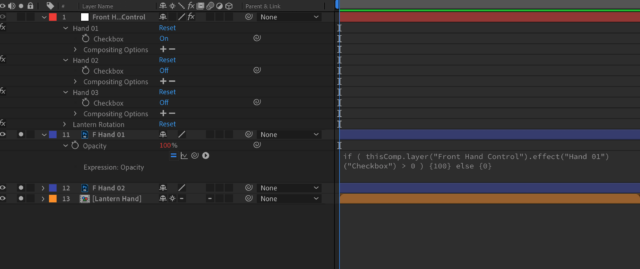
I have a character rig that I want to be able to use checkbox controllers to turn on and off their opacity – I have that figured out with this expression:
if ( thisComp.layer(“Front Hand Control”).effect(“Hand 01”)(“Checkbox”) > 0 ) {100} else {0}
However, I have three different checkbox controls and would like for them to be able to be toggled simultaneously, for example:
If I toggle on the First hand checkbox I would like the other checkboxes to turn off.
Then if I go to the next hand shape control and toggle that on, I would like the rest to turn off – like using a switch template.
I cant use time remapping and precomp the entire hand comps since there is animation built into the hands.
Image attached for clarification
If there is an easier way to do this I would love to know – for instance, is there a way I could have something be visible based on the position of another layer?
Thanks!