Creative Communities of the World Forums

The peer to peer support community for media production professionals.

Activity Forums Adobe After Effects TimeRemap with Random Frame Expression… NOT

  • TimeRemap with Random Frame Expression… NOT

    Posted by Nils Hammers on September 10, 2024 at 1:04 pm

    Hi all,

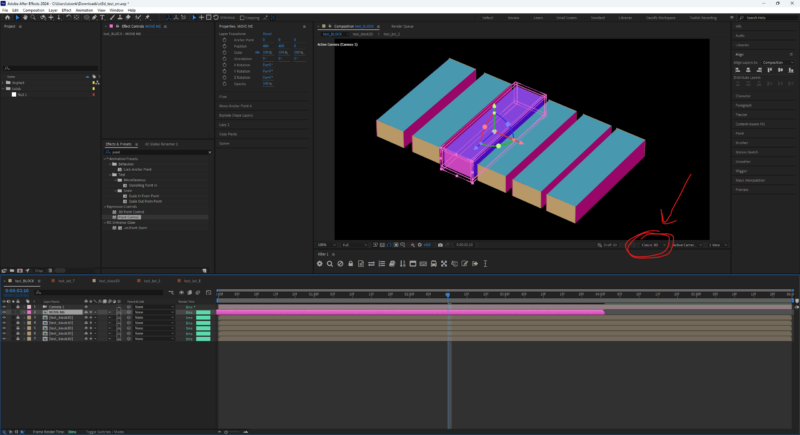
    I was about to quickly generate a bunch of a slightly random 3D boxes made of several drawings. For that I’ve made a 6 sec long Source comp where I randomized pieces for every side, added slight CC too, all expressions, and it really appears random for every frame in that comp.

    Now I nested that Source into main comp, enabled 3D and collapsed transforms. I froze Time attribute and added an expression, which picks random frame within the Source comp.

    r = source.duration ;
    seedRandom(index, timeless = true) ; random() * r

    However, even the timecode for every box layer is different, the TimeRemap seems doesn’t work with that, as all my blocks render from some particular frame. Tried changing render engines, emptying mem&cache – nothing.

    What might have went wrong? How to fix it?

    I tested out same concept with nested Text layer, and it worked flawlessly, *almost* no repeating numbers.



    Nils Hammers replied 1 year, 7 months ago 2 Members · 7 Replies
  • 7 Replies
  • Nils Hammers

    September 10, 2024 at 2:14 pm

    UPDATE: Weirdest of all, soloing the single box layer changed its rotation, where I also have similar expressions, based on timeless random seed. It is like soloing suddenly impacted the layer’s index OR enabled the execution of particular expression. I can’t tell which one is true, as the details are small, but scene – too large.

    Also, soloing everything was similar to not having solo’s at all, it is some certain number of visible layers that enables certain number of expressions, like there’s a limit, which seems illogical.

    Can many randoms be too much, so that the software misbehaves, and expressions don’t work too?

    I have some 60+ of those boxes there, so I needed them random to look organic.

    If anyone has an experience with stress tests where AFX fails, please share – I’d gladly avoid such pitfalls in the future.

  • Nils Hammers

    September 11, 2024 at 2:04 pm

    So, the problem seems to run even deeper and is unrelated to expressions.

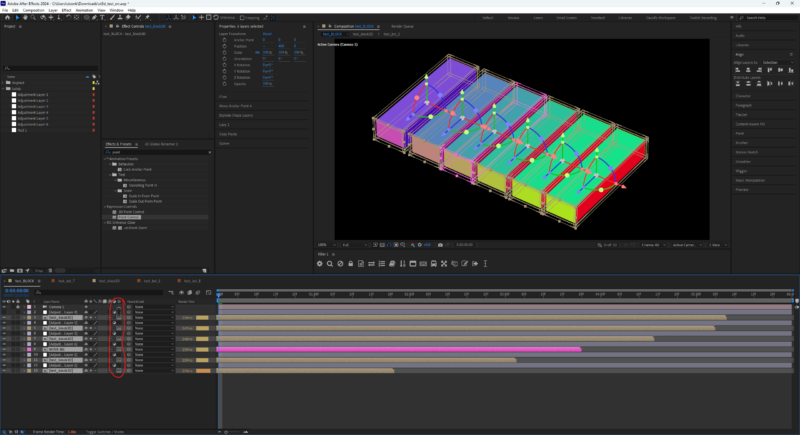
    Apparently, if I nest several copies of the same 3D comp with collapsed transformations, then the very top layer influences the rest of the copies, e.g. changing its time value (animated timeRemap, expression, or simply shifting the layer over time), makes all the underlying layers within the 3D container, look as the top one.

    From there, all what I experienced earlier.

    Am I missing anything essential about collapse transformations + time attribute? Such behavior seems fundamentally abnormal, however it should be tested by the other users, as it might be a local glitch.

    Here I add a AEP file made of solids alone, see yourself by shifting the “MOVE ME” layer on timeline back and forth. You can also try enabling randomization expressions in *T, *S, *E compositions, which will override the existing color animation and make it more obvious.

    Please, report back if you experience similar behavior.

  • David Conklin

    September 11, 2024 at 9:20 pm

    This does seem like a glitch, or at least an inconsistency.

    Fortunately, changing the 3D engine on the top-level comp from “Cinema 4D” to “Classic 3D” fixed the issue. Must be a bug in how the C4D 3D engine is handling instancing.

    If for whatever reason you NEED to use the C4D 3D engine. I was able to “cheat” it to make it work by throwing an adjustment layer (any visible 2D layer will work) between each of the boxes to “break” the 3D space up. Now each one retimes on its own.

    Hope that helps!

  • Nils Hammers

    September 12, 2024 at 8:30 am

    Hey David,

    Thanks for your input.

    I experience the same behavior also with Advanced3D renderer, not Classic3D.

    Yes, the AdjustmentLayer can do the “trick”, however, after that, the 3D depth sorting is lost, and you cannot do anything more complex without making a split-layer-hell in the Timeline, e.g. I have some 60+ of such blocks for pavement borders, plus camera motion.

  • David Conklin

    September 12, 2024 at 2:48 pm

    What aspect of the Advanced 3D renderer do you need for this comp? Remember, you can specify a different 3D render engine for each composition. So, even if you need to do something like extrude text or import a 3D model in another comp, you can still set this comp to Classic 3D.

  • Nils Hammers

    September 13, 2024 at 7:16 am

    I need the AcceptLights: OFF 😀 Apparently, this option is not there in A3D, yet.

    Otherwise, I am using several layers of nesting to build complex pseudo 3D environments. What you say about mixing renderers in this scenario, at least until recent, won’t work – as soon as you collapse transforms, the comp is rendered by the engine of parent composition. Similarly, I can’t use AdjustmentLayers. Regarding the Classic3D, it is too basic, e.g. compare its camera and material properties to what’s in C4D.

    And now, this issue too. I am in a Limbo – Adobe dumped what was working earlier, meanwhile, what could work is not made yet or is glitchy. *Sigh*

  • Nils Hammers

    September 16, 2024 at 1:58 pm

    UPDATE: Testing even further, I found out, that the affected part is the Effects animation, whereas the transform animation is correct: separate, underlying layers unaffected. See attached AEP for demonstration and own tests, as the remedy for this is still unknown.

We use anonymous cookies to give you the best experience we can.
Our Privacy policy | GDPR Policy