

Activity › Forums › Adobe Premiere Pro › Timeline constantly freezing
-
Timeline constantly freezing
Posted by Andres Cuervo on December 31, 2023 at 2:33 pmI have tried all the workarounds in youtube, they sometimes work momentarily, mostly they don’t for me.
1. Windows- workspace – all panels
2. Windows – workspace – reset to saved layout
3. PID number prompt
4. Enable Preview Area
5. Reduce full screen and move timeline repeatedly.
Please help.
Rob Ainscough replied 2 years, 8 months ago 5 Members · 9 Replies -
9 Replies
-

Mads Nybo jørgensen
December 31, 2023 at 3:57 pmHey Andres,
How annoying on this last day of the year (depending on your location), sorry to hear about your trouble.
Just as a side comment, it is always good to include your technical specs in posts related to performance.
My suggestions would be:
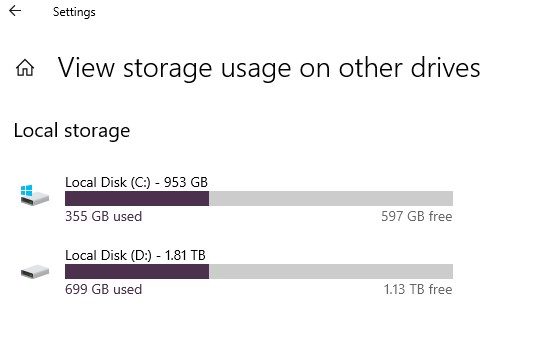
1) How full and how fast are your drives running?
There used to be a rule of thumb that your drives should be 25% empty when working with video, as this makes them run faster. If your drives are full, start by creating more space.
And, just in recent years, I’ve been given USB-2 Hard-Drives to edit HD multicam from. One project was FCPX, and one was PPro – both had the same “problem”.2) Trash your preferences and renders, and see if that unfreezes the sytem.
3) Setup a new PPro project (v2), and import in the last sequence.
Yes, you may have to import all of your other footage + re-render all files.4) Power down the computer, take a half-hour break, then turn it back on.
Sounds crazy, but often works.Hope that this helps you.
HAPPY NEW YEAR!
Atb
Mads -

Dennis Dean
December 31, 2023 at 6:21 pmAll excellent idea from Mads.
Here’s one more I use – usually when I have a timeline that won’t render (rather than freezing) but it might be helpful to you.
If you’re always freezing in the same place – it could be a clip or other item your timeline doesn’t like. You can find it by rendering segments of the video until you find the half of the timeline that has a problem. Keep rendering each unrendered segment by half until, eventually, you’ll locate the clip, effect, etc. that’s causing the issue. Then swap it out for something different or create it separately, as a separate clip, and place the new copy back into the timelines. Again, this this is more for rendering issues but it might be helpful. Good luck!
-

Eric Santiago
December 31, 2023 at 9:59 pmIn the past this would occur (both platforms) depending on the codec used.
Years ago it was a flavour or Avid DNxHD on Windows.
Currently have not experience this in Premiere on both platforms.
Check your working codec.
-

Andres Cuervo
January 1, 2024 at 8:21 pmThank you so much and Happy New Year to you.
I have 2 Solid State HDs. They are less than half full. I have cheques performance. I have trashed Preferences. The problem is in all projects. Have powered down many times. Problem persists.

-
Andres Cuervo
January 1, 2024 at 8:23 pmThank you so much. Unfortunately the problem is in all projects and regardless of where the timeline is.
-
Andres Cuervo
January 1, 2024 at 8:25 pmThis is a difficult one, I need more information on how to proceed. Thank you.
-
Eric Santiago
January 1, 2024 at 8:32 pmSpecs would help.
What format are the files?
Is there a mix of codecs on this project?
-
Mads Nybo jørgensen
January 1, 2024 at 8:42 pmHey Andres,
If you have tried everything else, there are a few more options that I can think of, neither is pretty, Sorry.
In no specific order:
– Export XML, import XML into new project and see if that allows you to playback without the Sequence freezing up?
(You could also try to import the XML into an earlier version of PPro, and see if that does the trick?)
– If there is space on the C: Drive, copy all of your media footage from D: to that drive. (If already there, copy all media to the D: drive)
– Unistall all of Adobe. Power down computer, leave it for 15 mins. Power-up. Use CCleaner or similar to remove any DLL’s etc hanging around. Re-install Adobe CC.
One last thing to investigate is whether you are using panels from 3rd parties, like Frame IO, Motion Array or similar?
Same goes with plug-ins, have any of those “lost” their licence information.Hope that this helps.
Atb
Mads -

Rob Ainscough
January 3, 2024 at 7:40 pmAdobe doesn’t like heavily compressed footage. When they switched from a 32bit to 64bit application many moons ago (2017 I think), they could no longer use existing compression libraries and had to write their own for 64bit. Adobe is also VERY sensitive to any missing frame data which can also cause it to freeze. As a result they’ve struggled to make decompression work while working a timeline and moving around frequently (big jumps in the timeline). The larger the file and the more one moves in the timeline, the worse the problem is until eventual freeze. For Adobe I had to do the following to resolve as much as possible:
1. Convert all media to ProRes 422 HQ.
2. If still having issues, then enable Proxies.
3. Clear out all audio/video previews/cache.
4. Check audio settings and reset, disable while scrubbing, check mixdown, check sample rate and I/O buffer size, etc.
Cheers, Rob.
Reply to this Discussion! Login or Sign Up