Creative Communities of the World Forums

The peer to peer support community for media production professionals.

Activity Forums Adobe Premiere Pro Timecode Sync Issue in Premiere 25.3

  • Timecode Sync Issue in Premiere 25.3

    Posted by Michael Mann on August 6, 2025 at 9:34 am

    Hello,

    Running into an issue with the timecode sync feature in Premiere 25.3.

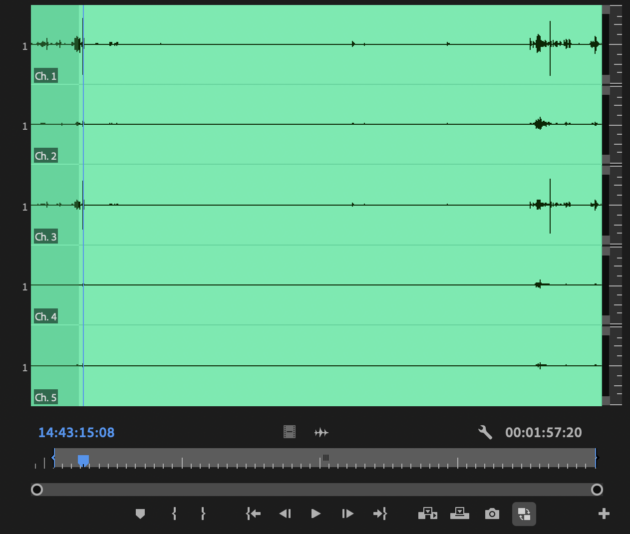
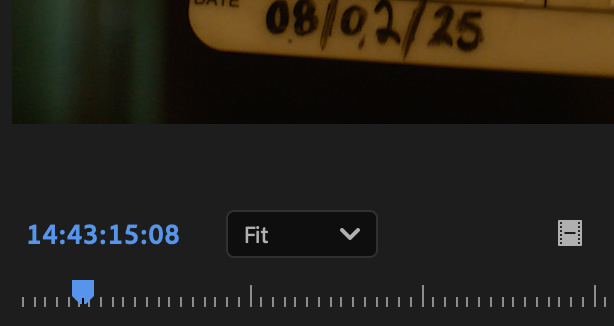
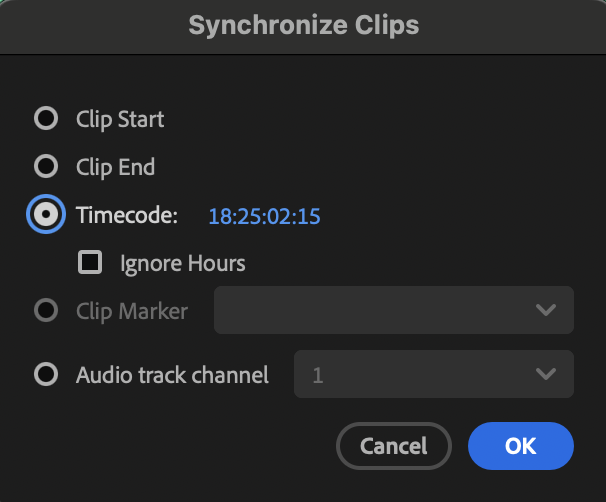
    The timecodes of my audio and video both match up (attaching pictures), however when I go to Timecode Sync, the timecode in the panel is wildly off, and the sync throws the entire audio clip down the timeline. In the pictures I’m dropping I’ve manually synced and double checked that both timecodes are synced to eachother and correct, framerate isn’t the issue either. Any way to fix this issue? Thanks in advance.

    Mads Nybo jørgensen
    replied 9 months, 1 week ago
    2 Members · 5 Replies
  • 5 Replies
  • Mads Nybo jørgensen

    August 6, 2025 at 9:54 am

    Hey Michael,

    Adobe Premiere Pro v25 is a version to avoid. Sorry. But the programmers were either under pressure from management to deliver early and untested, or just something that doesn’t work, or just having a good old laugh. Whatever the reason, it is not good.

    If you are at the beginning of your project, what happens if you do the same process in PPro V24?

    What are the video and audio files codec(s) that you are trying to sync?

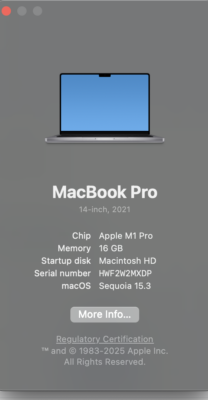
    With that, could be important what hardware and OS you are using?

    Atb
    Mads

  • Michael Mann

    August 9, 2025 at 3:43 am

    Hi Mads,

    Tried this in 24 and running into the same issue. Footage is Premiere created 422Proxy from APR4444, and audio is standard 48000hz wavs. Attaching my system specs below.

  • Mads Nybo jørgensen

    August 10, 2025 at 6:02 pm

    Hey Michael,

    Thank you for sharing specs, and rolling back the PPro version.

    If possible, can you sync the original APR4444 with the audio files?
    Then you’ll know if it is the proxies that are giving you trouble.

    Out of interest, have you used Audio as the option for sync, rahter than TC, if there was a mic running on the camera?

    How many clips are you dealing with for the whole project?

    Atb
    Mads

  • Michael Mann

    August 10, 2025 at 6:05 pm

    Hey Mads!

    Tried syncing to the OG footage and no dice either. Working with about 115 shots no onboard mic for scratch audio. Went though and manually synced the shots by hand so it’s all good, though an incredibly annoying issue I’d like to find a solution to so it doesn’t happen in the future. So weird.

  • Mads Nybo jørgensen

    August 10, 2025 at 7:07 pm

    Hey Michael,

    “Went though and manually synced the shots by hand so it’s all good”
    Sadly that was going to be my next suggestion.

    Out of interest, on your synced clips, do the synced Video and Audio at the start, and at the end, have identical timecodes?

    Atb
    Mads

We use anonymous cookies to give you the best experience we can.
Our Privacy policy | GDPR Policy