Creative Communities of the World Forums

The peer to peer support community for media production professionals.

Activity Forums Adobe After Effects Time selection handles for Comps and Layers

  • Michael Szalapski

    April 6, 2021 at 1:29 pm

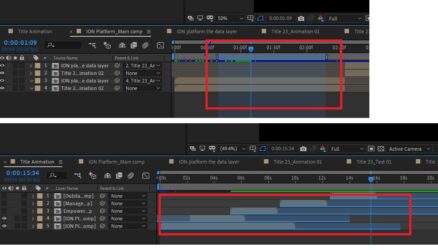
    The first example is a composition marker with a duration.

    The second example looks odd to me.

  • Terry Coolidge

    April 6, 2021 at 2:19 pm

    In your second screenshot…

    All layers appear to have out points set. The comps (layers) have durations that are longer than what will be shown since the out points have the layers ending early. Layer 4 appears to be the only layer that also has an in point set that doesn’t coincide with the actual first frame of the comp (layer).

  • Kalyan Tagore

    April 6, 2021 at 7:29 pm

    I have attached 2 AE files. Please check the comps that are already open. You will find the ‘time selection’.

  • Kalyan Tagore

    April 6, 2021 at 7:30 pm

    And may I know, how can I set up a time selectino within a ‘work area’ ?

  • Kalyan Tagore

    April 6, 2021 at 7:34 pm

    @Terry Coolidge : Yes.. thats exactly the issue. The layers in and out is already set right. They look fine, without any ‘hidden extension’.

    But if you click and drag the out point, the layer actually stretch.. (like it happens with a solid layer, for which there is no fixed duration). Please check the reference AE files.

We use anonymous cookies to give you the best experience we can.
Our Privacy policy | GDPR Policy