Creative Communities of the World Forums

The peer to peer support community for media production professionals.

Activity Forums Adobe After Effects Time remapped loops stopped syncing after position change

  • Time remapped loops stopped syncing after position change

    Posted by Lan lan Liu on March 23, 2021 at 9:34 am

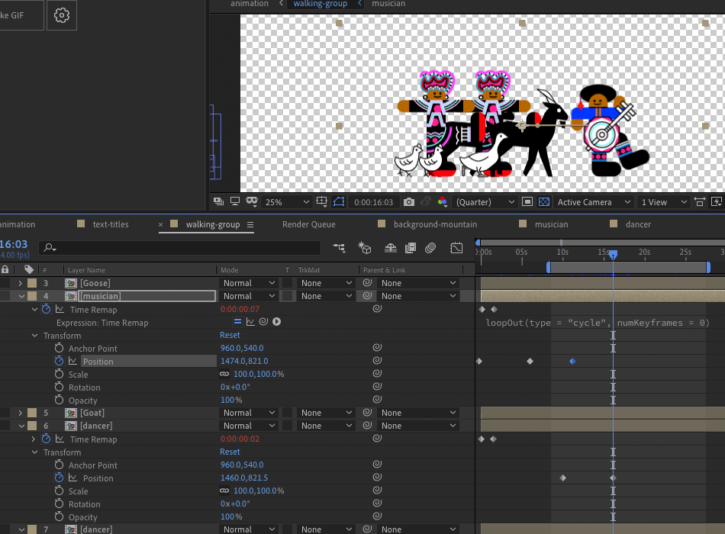
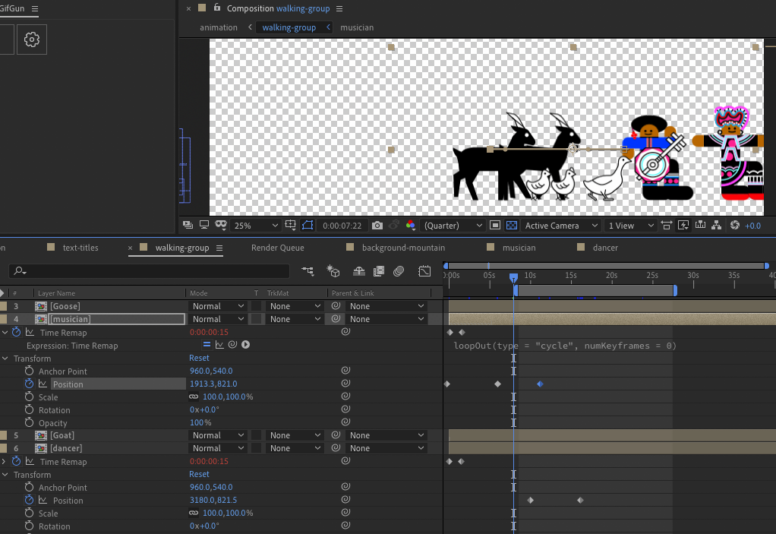
    Hi I have a very strange problem. I have two precomposed loops of two people dancing to the same beat. I put both of them into one composition and I created position keyframes for each of them to move from one point to another at different speeds. Before they moved to their final positions, their poses synced perfectly (see pic 1). However, after they reached their final positions and continued to dance, their poses somehow became out of sync (see pic 2). This is so strange and I have no idea what to do to fix it. Is this an internal error or am I missing something out? Thank you so much for any help!

    Patrick Grossien replied 5 years, 1 month ago 3 Members · 5 Replies
  • 5 Replies
  • Patrick Grossien

    March 23, 2021 at 12:24 pm

    Hi! It is hard to tell for me from this point, what should it look like at the end? That might help. To figure out what is going on.

    EDIT: I would check if the pre-comps are set perfectly – cropped to IN OUT points / same length? First and Last keyframes checked in the pre-comp? Maybe also just reset the loop to see if there is a difference. also, I mainly just use “loopOut();” for stuff like that, so I can make sure nothing ends up in between.

  • Graham Quince

    March 24, 2021 at 9:40 am

    A workaround might be to link the second precomp’s time remapping value to the first precomp. That way whatever frame is on Musician #1 will also be on Musician #2

  • Lan lan Liu

    March 24, 2021 at 11:15 pm

    Hi Patrick, thank you for your help. I haven’t totally figured it out but it does seem to be connected to the very minute differences in how each loop was time remapped. The loops themselves are exactly the same. But when remapped, I followed a best practice suggested on the internet to create a keyframe right before the last keyframe and delete the original last keyframe. That might be where I wasn’t precise enough to cause later problem.

    
The thing that I find interesting is, if I don’t reposition the loops, then they sync perfectly, so I did not give any thoughts to whether if time remapping had any problem. It is ONLY when they are repositioned and animated to move from one location to another, that they start to go out of sync. It’s even more strange that even in this situation, they start out perfectly in sync, and only when one of the loops reach its final position, that’s when the off-sync starts.

    So this phenomena has a direct relationship to keyframed positioning, but I just couldn’t figure out what it is. I tried to move the reposition timing by one frame ahead or behind, and I notice they off-sync at a different rate. Once I got them to sync by tweaking the repositioned keyframe timing initially, but once another loop reached another relocation, everything got off-sync again, and if I tweak the repositioned keyframe of the second loop, the sync that I got for the previous duration breaks away immediately. So I can never fix it this way.

    I haven’t gotten a chance to continue to work on it yet, but I will see if remapping each loop carefully with solve this mysterious issue. Thank you for your suggestion.

  • Lan lan Liu

    March 24, 2021 at 11:17 pm

    Thank you Graham, I will look into that. So strange that if I don’t move the loops, then they sync perfectly fine. And even if I move them, they still start off syncing perfectly fine, and only become off sync when one of the loops reaches its final location. So so strange.

  • Patrick Grossien

    March 25, 2021 at 10:01 am

    you can export and package a copy of that timeline if you like and send it over. I can dig into it.

We use anonymous cookies to give you the best experience we can.
Our Privacy policy | GDPR Policy