Creative Communities of the World Forums

The peer to peer support community for media production professionals.

Activity Forums Adobe After Effects the output is totally different from the AE preview :(

  • the output is totally different from the AE preview :(

    Posted by Donna Li on July 1, 2021 at 5:28 am

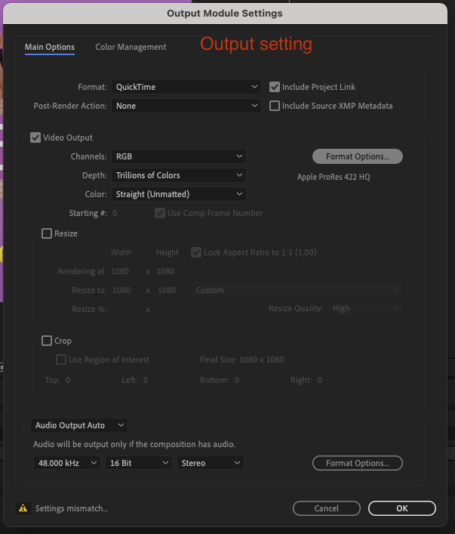
    the left-hand side of the following picture is my AE preview, and the middle is the output video, the right-hand side is the output spec

    you can see the color is hugely different, how can I fix this problem, cause my client has its own band color, and it’s totally not acceptable for this color different issue, but if I manually tone it in AE, it is just a blind guess

    But that is interesting, if I drag the output video into AE again, the color will switch back as like what I preview in AE! how come? it’s a problem or color setting I should make in AE? please give me some advice!


    Donna Li replied 4 years, 10 months ago 4 Members · 4 Replies
  • 4 Replies
  • Diogo Mendes-pinto

    July 1, 2021 at 8:08 am

    Someone may be able to better explain this but in my experience, diferent video players will give you slight different color.
    This has been a loooooong discussion all over the internet.

    I belive that there’s nothing you could do. If you set your project to don’t mannage color profiles and you use the right colors, then I think that’s it :/

  • Chris Voelz

    July 1, 2021 at 12:55 pm

    There is a documented gamma shift when viewing in QuickTime. If you open color mgmt there is a check box to compensate for QuickTime. I would recommend exporting to the color space of your final distribution. If for the web then enable color mgmt for srgb 2.1. I have found success using these methods while maintaining consistency between ae and final out.

  • Daniel Griffin

    July 1, 2021 at 10:57 pm

    I’ve been having the same problems. I found this article, maybe it will help you https://blog.frame.io/2019/08/26/color-management-abobe-cc/

  • Donna Li

    July 2, 2021 at 3:39 am

    Omg, thanks for your guys’ help! finally, the problem solved! I set the color mgmt to Rec.709 Gamma 2.4 and the problem is most likely solved, still has a little different, but that is acceptable, can just manually fine-tune a little bit then fix~

    Thank you so much!

We use anonymous cookies to give you the best experience we can.
Our Privacy policy | GDPR Policy