Creative Communities of the World Forums

The peer to peer support community for media production professionals.

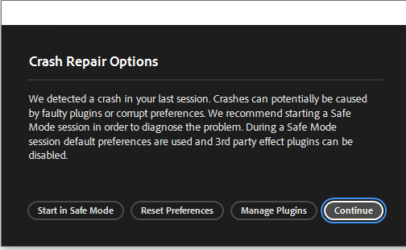
Activity Forums Adobe After Effects The ‘Crash Repair Options’ alert appears when relaunching After Effects.

  • The ‘Crash Repair Options’ alert appears when relaunching After Effects.

    Posted by Hyuna Kim on June 26, 2025 at 3:14 pm

    I’m currently using version 25.1.0.

    But recently, I’ve been occasionally seeing the “Crash Repair Options” alert when restarting After Effects.

    I’ve also tried updating my graphics card, but it didn’t resolve the issue.

    When I click “Continue,” I can use the program without any issues, and all settings remain unchanged.

    If there’s no definitive fix for the alert, would it be all right to just click “Continue” each time it appears and keep working?
    kivenemi kivenemi replied 10 months, 3 weeks ago 3 Members · 2 Replies
  • 2 Replies
  • John Martin

    June 26, 2025 at 7:57 pm

    to never see that error ever again, downgrade to 24 or 23. to still see it every x months, downgrade to the very first version of 2025. Best of luck.

  • Hyuna Kim

    June 27, 2025 at 7:52 am

    After the alert appears, I can continue using the program without any issues by clicking “Continue.” Would it be okay to keep using it like this?

  • kivenemi kivenemi

    June 27, 2025 at 10:13 am

    Yes, if clicking “Continue” allows you to use After Effects normally without any data loss, it’s generally safe to proceed that way. The “Crash Repair Options” alert usually appears when AE detects an improper shutdown or unexpected behavior from a previous session — even if nothing critical happened.

    However, to reduce how often it appears, try the following:

    • Always close AE properly (avoid forced shutdowns).
    • Clear yourcache (Edit > Preferences > Media & Disk Cache).
    • Periodically reset preferences by holding Ctrl+Alt+Shift (Cmd+Opt+Shift on Mac) while launching AE.
    • Keep plug-ins updated, as some can trigger these alerts.

    If your workflow stays stable and you’re not losing data, it’s okay to click “Continue.” Just keep backups of your projects, just in case.

We use anonymous cookies to give you the best experience we can.
Our Privacy policy | GDPR Policy