Creative Communities of the World Forums

The peer to peer support community for media production professionals.

Activity Forums Maxon Cinema 4D Textures not showing in Viewport

  • Textures not showing in Viewport

    Posted by Sara Jean on October 21, 2010 at 3:38 pm

    Just wondering if anyone has come across this problem. We’ve made a magazine page turn animation and there’s textures for the cover and inside pages (used a stick texture on a flat plane). The problem is that the viewport is not showing the different page textures but it’s perfectly fine in a preview or render. Is there a preference to allow us to see the textures as we work? Our enhance Open GL is on. Any ideas?

    Big thanks!!

    irfan khalid replied 4 years, 7 months ago 5 Members · 5 Replies
  • 5 Replies
  • Jean Paul

    October 21, 2010 at 5:47 pm

    hi
    do you mean other then
    turn on the
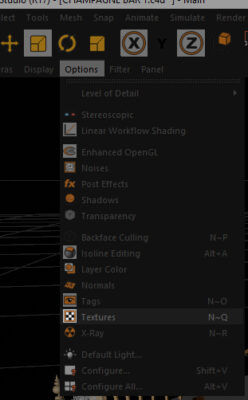
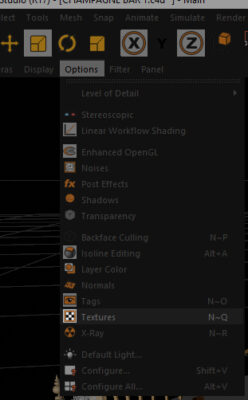
    Display – Textures

    ?

  • Cory Petkovsek

    October 21, 2010 at 8:55 pm

    Also be sure you’re in gouraud shading mode.


    Cory Petkovsek
    Corporate Video
    http://www.CorporateVideoSD.com

  • Sara Jean

    October 26, 2010 at 12:16 pm

    Hey guys,

    Thanks for the advice! Turns out we also needed to go to Display and turn on Transparency. For some reason that did the trick.

    Thanks again!!

    Sara Jean

  • Linh Bui

    April 20, 2016 at 2:49 pm

    hello. i just had a trouble like this. c4d can show texture in view, only show in render view. help me how to fix, please. thank you very much.

  • irfan khalid

    September 19, 2021 at 10:43 pm

    active Texture in “Option” or press N~Q.

  • irfan khalid

    September 19, 2021 at 10:44 pm

    hope it will help.

We use anonymous cookies to give you the best experience we can.
Our Privacy policy | GDPR Policy