Creative Communities of the World Forums

The peer to peer support community for media production professionals.

Activity Forums Maxon Cinema 4D Texture from centre of object – HELP !

  • Texture from centre of object – HELP !

    Posted by Ringo Hopewell on November 22, 2023 at 4:55 am

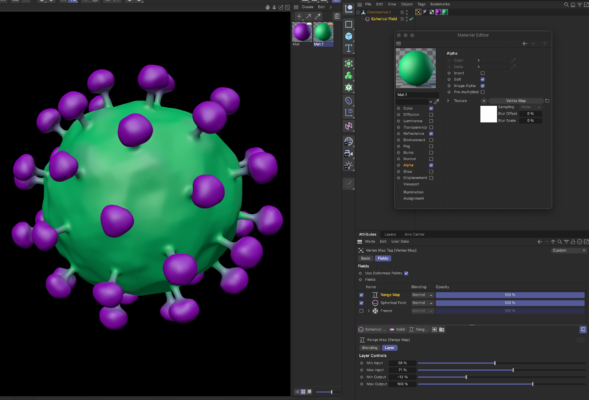
    Ok…. I have a sphere with protruding nodules (think coronavirus), I want to apply a texture that has a spherical gradient from the centre of the object to the outermost points. i.e. it’s one colour at the center point of the object and as you get further away the colour changes. So the main body of the “virus” would be say blue, and it would change to say, purple along the protruding stalks.

    I’ve tried all the gradient modes – thinking 3d-Spherical would do the trick, but no.

    Any help, suggestions welcome.

    Thanks

    Kouraib Abdmalek
    replied 2 years, 5 months ago
    2 Members · 4 Replies
  • 4 Replies
  • Kouraib Abdmalek

    November 22, 2023 at 9:50 am

    Hi Ringo,

    If you can use Cloner in your scene, you can do that using Field and Color Shader in the Alpha channel as in the attached tutorial.

    https://www.youtube.com/watch?v=-Al9th3CKCU

    Thanks

    Some contents or functionalities here are not available due to your cookie preferences!

    This happens because the functionality/content marked as “Google Youtube” uses cookies that you choosed to keep disabled. In order to view this content or use this functionality, please enable cookies: click here to open your cookie preferences.

  • Ringo Hopewell

    November 22, 2023 at 11:32 am

    Hi Kouraib,

    Thanks for that… it didn’t work for the single object that I’m trying to texture BUT it did set me on the right path !

    In case it’s useful for anyone, what I ended up doing was adding a vertex map to the object, then material 1, then material 2.

    I set the alpha on material 2 to Effects – Vertex Map.

    On the vertex map tag there’s a checkbox for using fields to drive the map.

    With this checked, I then added a spherical field. Changing the field’s size allows a mix between the two materials at a distance from the centre point of the object (spherical field).

    Hurrah !

  • Ringo Hopewell

    November 22, 2023 at 11:43 am
  • Kouraib Abdmalek

    November 22, 2023 at 12:55 pm

    Thank you so much for sharing this with us, I’m so glad my post was useful to you, I knew there was a way to do the same thing with single object but I can’t remember it and I didn’t have time to research further so I sent you the cloner method while I had time to return to that but I find that you are do it yourself, thanks once again.

We use anonymous cookies to give you the best experience we can.
Our Privacy policy | GDPR Policy