Creative Communities of the World Forums

The peer to peer support community for media production professionals.

Activity Forums Adobe After Effects Expressions text colour based on position/index in word

  • text colour based on position/index in word

    Posted by Christian Hopkins on April 6, 2022 at 7:35 pm

    Hi,

    I’m trying to write an expression that will make the characters of a word different/specific colours, before changing to white. I think the best approach would be to choose a colour based on its index position, although there may be a simpler way.

    I have a version working with the wiggly selector, although I can’t control the colour.

    Changing to white is done with a fill colour animator with the range animated, so that doesn’t need to be in the expression.

    I could create multiple Fill Color animators but would need to manually select the range for the different letters, which will make editing problematic.

    Thanks,

    Christian Hopkins replied 4 years ago 4 Members · 8 Replies
  • 8 Replies
  • Tomas Bumbulevičius

    April 9, 2022 at 5:18 pm

    Christian – how you are going to decide “which” words should have that effect?

  • Filip Vandueren

    April 9, 2022 at 5:19 pm

    Hi Christian,

    if you start from black text and have a text-animator change the fill to white, you can then control how much R, G and B are affected separately with an expression, the result should be three percentages.

    So an expression-selector with result [100,50,25] on a white fill color would change the black letters to a Bright Orange).

    This example would make a rainbow:

    hue = textIndex/textTotal;
    newColor = hslToRgb([hue,01,0.5,1]);
    [newColor[0], newColor[1], newColor[2]]*100;
  • Christian Hopkins

    April 24, 2022 at 9:28 pm

    Sorry for the slow response, I didn’t subscribe to my own question. Lesson learnt, ha.

    It’s all the words in a text layer that will be affected. So we don’t need to be selective about which words. We just need to be able to choose specific colours. Sorry if that wasn’t clear in my original post.

  • Christian Hopkins

    April 24, 2022 at 9:37 pm

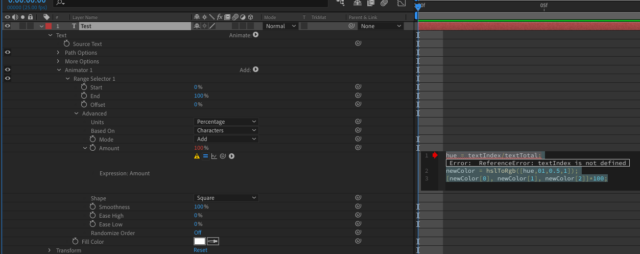
    Thanks for answering Filip. I’ve tried this expression on text Fill Color text animator, but it has the following error:

    Error: ReferenceError: textIndex is not defined.

    What am I doing wrong?

    Thanks!

  • Dan Ebberts

    April 24, 2022 at 11:31 pm

    textIndex only works for expressions applied to the Amount property of an Expression Selector. Did you maybe not set that up correctly?

  • Christian Hopkins

    April 25, 2022 at 9:32 am

    Hi Dan, thanks for getting back to me.

    I’m sure it’s user error on my part somewhere but the expression is on the Amount property of the Fill Color animator – I’ve attached a screenshot of the expression with the error.

  • Filip Vandueren

    April 25, 2022 at 9:49 am

    Hi Christian, you need a different kind of selector: remove the “Range selector” and add an “Expression Selector”, then apply the expression there.

    An expression on Amount of a range cannot calculate different amounts for different characters/words/lines.

  • Christian Hopkins

    April 25, 2022 at 11:37 am

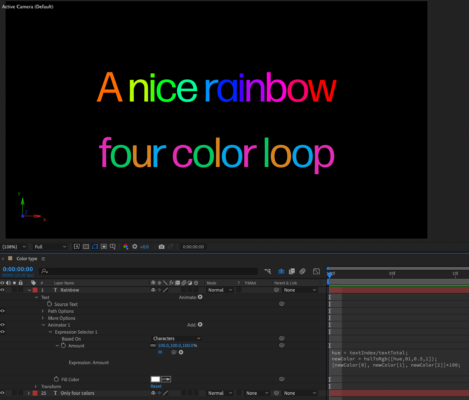
    Thanks Filip! It’s getting there. How do I get specify the RGB values? What I need is just four colours that loop – as per the screenshot mock up. The first line is your expression. What I need is the second line, using specific RGB values.

We use anonymous cookies to give you the best experience we can.
Our Privacy policy | GDPR Policy