Creative Communities of the World Forums

The peer to peer support community for media production professionals.

Activity Forums Adobe After Effects Expressions Text Box ‘Bottom Up’ Expression with x-heights?

  • Text Box ‘Bottom Up’ Expression with x-heights?

    Posted by Henry Gaunt on May 26, 2021 at 11:17 am

    Hi!

    Can this expression be modified to ignore text descender?

    var b = sourceRectAtTime(time,true);
    b.left *= scale[0]/100;
    b.top *= scale[1]/100;
    b.width *= scale[0]/100;
    b.height *= scale[1]/100;
    [b.left + b.width/2 , b.top + b.height]

    I’m using it in a lower third which is made up of left-justified text, centred, in a shape layer. This shape layer is a box, centred on the screen which (using pins & boxes) adjust automatically to the text layer.

    When you add a second or third line of text (thanks to the expression above), the text remains anchored to centred/bottom and each new line of text pushes the existing line of text up. Similar to how a typewriter works.

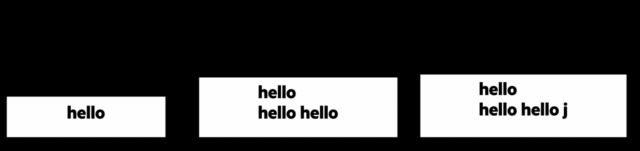
    It all works perfectly until you add a character descender, as the text layer jumps up so the bottom of the descender sits on this anchor point.

    I’ve attached an image of what happens, the issue being a box with two lines of text will be a different position to a box with two lines of text with a descender.

    I did find this fantastic resource here going into great deal about xHeights and numLines, but it’s far beyond my understanding to meld the two. https://www.motiondeveloper.com/blog/dealing-with-descenders

    I really really appreciate any help you can give me as I’ve been search and testing for days with no luck.

    Thank you

    Henry

    Henry Gaunt replied 4 years, 11 months ago 2 Members · 2 Replies
  • 2 Replies
  • Kevin Camp

    May 26, 2021 at 11:32 pm

    since you can’t really use sourceRectAtTime() to derive the height, you could try multiplying the leading by the number of lines.

    this should reposition the text layer’s anchorPoint to be at the baseline of the bottom text line (I am assuming that each line is created with a return):

    txt = text.sourceText ;
    txtLines = txt.split('\r').length ;
    txtLeading = 60 ;
    y = txtLeading * ( txtLines - 1 ) ;
    value + [ 0, y ]

    you will need to manually enter the txtLeading, but we may be able to derive that using style…

    and you’ll have to do something similar to calculate the height for the shape layer, so it looks at the number of lines * the leading rather than sourceRectAtTime().height.

    if I have more time tomorrow, I’ll probably look into it : )

  • Henry Gaunt

    May 26, 2021 at 11:34 pm

    Thank you Kevin,

    I was just typing up a reply with a solution – I reached out to Tim at Motion Developer (link above) and he came back with this code which nails it. Hopefully someone will find this amazing too!

    const sourceRect = thisLayer.sourceRectAtTime(0, false);

    let { width, height, top, left } = sourceRect;

    const { fontSize, leading, autoLeading } = thisLayer.text.sourceText.style;

    const lineGap = autoLeading ? fontSize * 1.2 : leading;

    const textSize = fontSize / 2;

    const numLines = Math.max(

    text.sourceText.value.split(/[^\r\n\3]*/gm).length - 1,

    0

    );

    height = lineGap * (numLines - 1) + textSize;

    topLeft = [left, -textSize];

    thisLayer.add(topLeft, [width / 2, height]);

We use anonymous cookies to give you the best experience we can.
Our Privacy policy | GDPR Policy