Creative Communities of the World Forums

The peer to peer support community for media production professionals.

Activity Forums Adobe After Effects Text animator issues

  • Text animator issues

    Posted by Silvere Captier on May 6, 2022 at 12:38 pm

    Hello Creative Cow community,

    I am creating some text animations, and because I want to update my text anytime, I would like to use only text animator and/or expressions.


    This is the two problems I face :

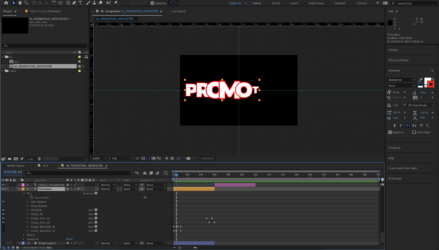
    – When I type a word, for example “PROMOTION”, the “P” is bellow the “R”, the “R” is bellow the “O”, etc… ( as you can see on the picture)

    I would like to reverse it, the “P” above the “R”, the “R” above the “O”, etc… But I didn’t find any way to achieve this.


    – My second issue is this one, I would like to know if there is a way to apply a blur only on the red stroke surrounding the letters, in order to create a shadow effect if I put the stroke in black.


    Thank you for your answers, and I hope I explained myself quite clear because I’m French and my English is a bit weak…

     

    Silvere Captier replied 4 years ago 2 Members · 2 Replies
  • 2 Replies
  • Thiago Macedo

    May 6, 2022 at 12:59 pm

    the first issue, select your text layer, open “properties” go to “more options” and change the “inter-character blending” to “overlay”

    the second one, I would solve by duplicating the layer, using black and white colors on the text creating a Luma Matte layer to apply the style only on the stroke. But maybe there’s a better solution for that.

  • Silvere Captier

    May 6, 2022 at 1:12 pm

    Oh, thank you soooo much, I looked for hours into those properties, but I couldn’t find the right one… you are a life savior !!!

We use anonymous cookies to give you the best experience we can.
Our Privacy policy | GDPR Policy