

Activity › Forums › Adobe After Effects › Subdued Colours
-
Subdued Colours
Posted by Andy Brown on July 28, 2008 at 11:06 amHi Guys,
Does anybody know how to get subdued colours in AE? or FCP?
Thanks
AndyAndy Brown replied 18 years, 2 months ago 4 Members · 4 Replies -
4 Replies
-

David Bogie
July 28, 2008 at 3:39 pmImage control filters.
Color correction filters.bogiesan
This is my standard sigfile so do not take it personally: “For crying out loud, read the freakin’ manual.”
-

Darby Edelen
July 29, 2008 at 6:58 pmThe easiest way to do this is to use the Color Correction > Tint effect and reduce the “Amount to Tint” property to your taste. An alternative, that would give you the same result, would be to place a white or black solid above the layer and set it to the ‘Color’ blend mode. Then you can reduce the opacity of this layer to reduce the effect.
Another option is using the Color Correction > Channel Mixer effect and enabling “Monochrome.” This allows you to determine the contribution that each color channel will make to determining the lightness of the grayscale image.
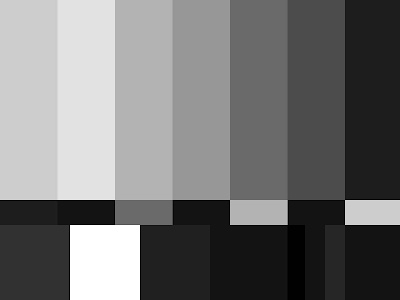
Reducing the saturation with the Color Correction > Hue/Saturation/Lightness effect will treat the contributions of all color channels equally and will end up giving you a less inspiring result. Here’s a sample:
Standard SMPTE Color Bars: 
SMPTE Color Bars with Saturation at -100 via Hue/Saturation effect:

SMPTE Color Bars with Tint effect:
Darby Edelen
Lead Designer
Left Coast Digital
Santa Cruz, CA


Reply to this Discussion! Login or Sign Up