Creative Communities of the World Forums

The peer to peer support community for media production professionals.

Activity Forums Apple Final Cut Pro Strange static on background clip

  • Strange static on background clip

    Posted by Daren Seifert on December 15, 2020 at 3:03 am

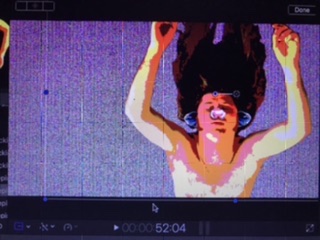
    Hey guys! Long time since I’ve been on here and I’m doing my first project on fcp X. So I’m using nothing but still frame images on both the background and foreground. But whenever I add key frames to the foreground still, it creates this strange static image on the background still image. I’ve been using work arounds my limiting movement with key frames but it’s starting to ruin some of the ideas I had going for it. Thanks in advanced!

    Joe Marler replied 5 years, 4 months ago 2 Members · 1 Reply
  • 1 Reply
  • Joe Marler

    December 15, 2020 at 12:04 pm

    The pattern is reminiscent of a graphics hardware problem. What year and model of Mac, what version of FCP and MacOS and what GPU?

    You can try running Apple Diagnostics, but it’s a rudimentary test and an error-free pass does not mean a clean bill of health. However if it finds something it’s usually significant: https://support.apple.com/en-us/HT202731

    You can also try running the GPU-intensive BruceX benchmark. Make sure background rendering is off, and export to a ProRes 422 file: https://blog.alex4d.com/2013/10/30/brucex-a-new-fcpx-benchmark/

    Also select each foreground and background image, and in Inspector (CMD+4 toggles), what is the blend mode for each one? Are the foreground and background images JPG, PNG, or what?

We use anonymous cookies to give you the best experience we can.
Our Privacy policy | GDPR Policy