

Activity › Forums › Apple Final Cut Pro › Started Editing in Pro-Res, Need to ReLink to R3D Files
-
Started Editing in Pro-Res, Need to ReLink to R3D Files
Posted by Martin Bentsen on April 9, 2015 at 4:41 pmHi Everyone, I’d really appreciate any advice on this topic:
How can I reconnect my media to the R3D format? I originally transcoded all my Red footage to Apple Pro-Res, imported to FCP, edited my film, and now I want to reconnect those ProRes clips to the R3D files? I am having trouble finding answers online to this anywhere.
Originally when we started editing this film years ago, FCP did not work with R3D files, otherwise I would have just imported the R3D files to FCPX originally. Thanks!
Ben Balser replied 2 years, 5 months ago 5 Members · 11 Replies -
11 Replies
-

Eric Santiago
April 9, 2015 at 5:25 pmhttps://www.youtube.com/watch?v=jSoyoQ-QJZ8
This work?
Some contents or functionalities here are not available due to your cookie preferences!This happens because the functionality/content marked as “Google Youtube” uses cookies that you choosed to keep disabled. In order to view this content or use this functionality, please enable cookies: click here to open your cookie preferences.
-

Jeremy Garchow
April 9, 2015 at 5:32 pmIf what Eric sent doesn’t work for whatever reason, send an FCPXML to RedCineX, relink to R3D, export an FCPXML from there, and import to FCPX.
Jeremy
-
Eric Santiago
April 9, 2015 at 7:20 pmI did a test with REDCine and so far Its not working for me.
The error incompatible files due to same media type and similar audio channels pops up.
Not so sure why this isnt working via REDCine but I know it works when you convert using FCPX.
-

Martin Bentsen
April 9, 2015 at 7:23 pmThanks for the responses, I really appreciate them! I will try this in a little while and let you know if I have trouble.
-
Jeremy Garchow
April 10, 2015 at 3:18 am[Eric Santiago] “The error incompatible files due to same media type and similar audio channels pops up.”
In FCPX?
You would need to FCPXML to RedCine, relink in RedCine, then make another FCPXML back to FCPX and import that, which should now be attached to the R3D.
There’s no relinking to do back in FCPX once this happens, as the FCPXML should have the info needed to link to R3D. Make sure you have the Red plugs installed for final cut pro.
-
Eric Santiago
April 10, 2015 at 2:19 pmThanks Jeremy.
To be honest I only did a quick test with Export from RCX.
Just wanted to see if it works that way.
I havent used that option in a long time.
I only use Export for dailies/proxy for end users. -
Martin Bentsen
April 10, 2015 at 3:11 pmThank you! this video was excellent and super helpful. However after connecting 400 files, I still have 22 that are not connecting. Is there a way to manually relink them? I will continue reading the other posts that were made, maybe the answer is in there.
-
Martin Bentsen
April 10, 2015 at 3:14 pmI couldn’t find anything helpful for the remaining few files. Any ideas of on how to manually reconnect clip by clip?
I know where the R3D files are on my computer but how do I relink to them if FCPX isn’t recognizing it as the same file?
All of your help here has been very useful and I appreciate it.
-
Jeremy Garchow
April 10, 2015 at 3:57 pm[Martin Bentsen] “I couldn’t find anything helpful for the remaining few files. Any ideas of on how to manually reconnect clip by clip?”
Take those offline clips. Put them in a Project, Export an FCPXML.
Download RedCineX Pro. Import the FCPXML. Point RCXPro to the proper R3D files. Do they relink?
-

Kris Strobeck
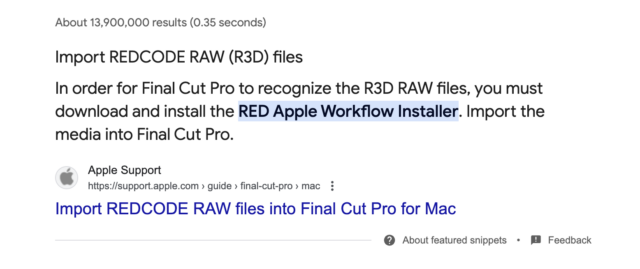
May 1, 2024 at 6:11 pmBeen a long time since this post, but here is the current solution. You need to install this to use Red footage with Final Cut Pro X.
https://www.red.com/download/red-apple-workflow-installer


Reply to this Discussion! Login or Sign Up