

Activity › Forums › Adobe After Effects › Spreadsheet -> AE
-

Marko Suto
December 13, 2018 at 9:01 am -

Walter Soyka
December 13, 2018 at 2:42 pm[Marko Suto] “Hi, this is what I use for daily TV broadcast:
https://aescripts.com/compsfromspreadsheet/“Absolutely, CompsFromSpreadsheet is a fantastic solution for turning out many data-driven variations on one template. We use it a lot, too.
My script above is not even a little helpful for that scenario! This will set up a set of different, blank comps with different and customizable names, resolutions, PARs, durations, and frame rates.
Walter Soyka
Designer & Mad Scientist at Keen Live [link]
Motion Graphics, Widescreen Events, Presentation Design, and Consulting
@keenlive | RenderBreak [blog] | Profile [LinkedIn] -

Randy Gonzalez
June 10, 2021 at 4:42 pmHi Walter, I have same question from Adam and it looks you have the answer 🙂 But the link to your script and screenshots are broken 🙁 Is there a way to have access to those files? Thanks!
-
Walter Soyka
June 14, 2021 at 4:26 pmHi Randy! It looks like the links got broken in the COW’s migration last year. I dug through my archives and found this for you.
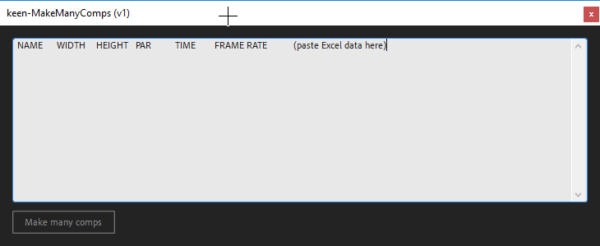
When you run the script in Ae, it will open a window with a set of column headers, ready to copy and paste to Excel. Left to right, it’s Comp Name, Comp Width (in pixels), Comp Height (in pixels), Comp Pixel Aspect Ratio (make this 1 for square pixels unless you know specifically you need something different), Time (in seconds), and Frame Rate (in frames per second).
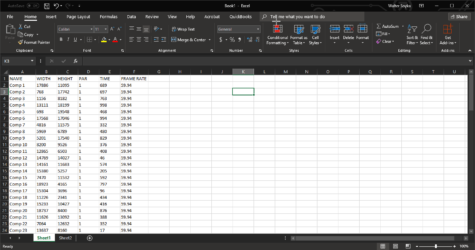
In Excel, create and fill in the data for each comp you want to make, one per row. Select all and copy.
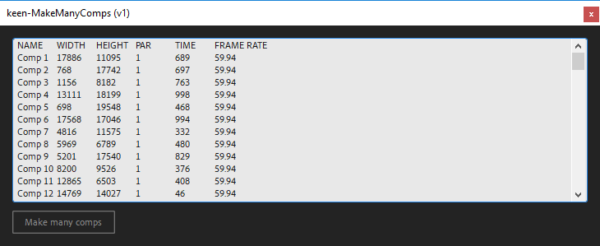
Back in the script, clear out the text entry box and paste your Excel data (including the column headers). Hit the “Make Many Comps” button and you’re all set.
Reply to this Discussion! Login or Sign Up