-
Source Text Expression – Caching Slow
Hi, the machine I’m using is a MacBook Pro, Apple M2 Max chip, 64GB RAM & 1TB Hardrive.
I’ve recently added the expression below to a text layer:
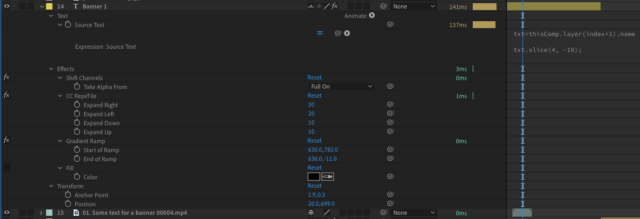
txt=thisComp.layer(index+1).name
txt.slice(4, -10);
This is looking at the video file name below the text layer for the source text and then removing the first 4 and last 10 characters i.e. 01. Banner Name 00001.mp4 becomes Banner Name.
There is also some effects added to create a box banner effect around the text, see image.
The issue is that the preview has become very very slow on my machine (previously it was very good).
Another colleague is using the exact same machine with the same settings and having no issue with playback.
If I remove the expression it works perfectly.
Any advice would be appreciated.