Creative Communities of the World Forums

The peer to peer support community for media production professionals.

Activity Forums VEGAS Pro Sony Vegas Ram usage

  • Sony Vegas Ram usage

    Posted by Derek Roorda on April 17, 2012 at 2:49 am

    Hey all,

    After watching a few renders and system resoucres being used with task manager, I’ve noticed that my cpu load stays aroun 80%, while my ram usage is only 4.5. Is it just me, or is this ridiculously low considering I have 16 gigs of ram? Am I missing something here?
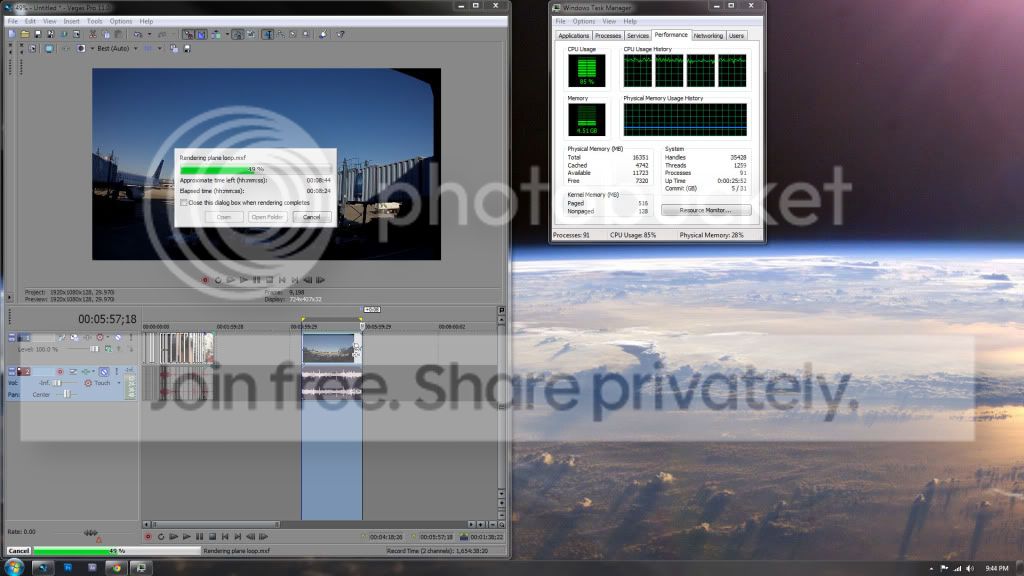
    My system specs:
    intel I5 2500k OCed 4.6
    16gb corsair vengance 1600 ram
    radeon hd 4870 1gb
    2TB western digital external HD usb 3.0
    internal 350 5200RPM cheapie WD
    windows 7 64bit
    vegas 11 64 bit

    Any help would be much appreciated

    Seth Estrada replied 14 years, 1 month ago 2 Members · 1 Reply
  • 1 Reply
  • Seth Estrada

    April 17, 2012 at 4:41 pm

    You can change the amount of RAM used for timeline pre-render and RAM previews by going into the preferences/options menu inside of Vegas Pro. It won’t necessarily change the amount of RAM required for final rendering, as final renders are usually more hampered by CPU/GPU processing speed than available RAM, but with 16GB to burn it will speed up your overall workflow.

    Idiot Savant… ok, maybe just Idiot
    https://seth.savant-studios.com

We use anonymous cookies to give you the best experience we can.
Our Privacy policy | GDPR Policy